Forum Discussion

[Development] Microsoft Teams get crash randomly after 5~30mins
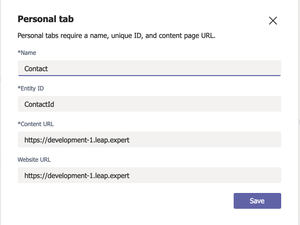

How did you integrate the tab into Teams? Did you use the Document Library tab, SharePoint tab, or Website tab?
Also Kindly provide below information.
1. MS diagnostic logs ( Keyboard shortcut: Option + Command + Shift+1 )
2. Fiddler trace
2. Screenshots

Step 1: install App studio
Step 2: import my app ( in attachment LeapXpertTest(1).zip)
Step 3: open it and let it idle for few hours, don't need to click anything , it might randomly crash
I just updated new log in attachment, today 14-November it still crash with the same reason: 'Unhandled exception occured Error: Object has been destroyed'. I opened my app and did other tasks, after few hours, it just auto closed.
Did you use the Document Library tab, SharePoint tab, or Website tab? I use website tab
Fiddler trace: I don't use it now, I will try to install this
- Gousia_BegumNov 18, 2019Former Employee
Jon_Leapexpert Were you able to download Fiddler and get the Fiddler trace?
- Jon_LeapexpertNov 18, 2019Copper Contributor
No, I can not install it in my macbook ...
By the way, could you know when the error Unhandled exception occured Error: Object has been destroyed happens ? Does this relate to Teams sdk ?
- Gousia_BegumNov 19, 2019Former Employee
Jon_Leapexpert We would need the Fiddler Trace to investigate this issue further. Could you please check if you could download fiddler and get the Fiddler Trace for the issue?