Forum Discussion

Change name of Bot tab in Teams application
 Aug 11, 2023
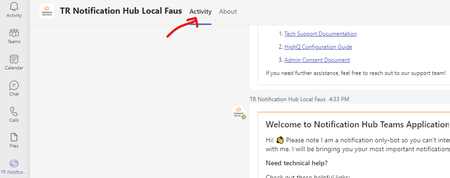
joseFaustinos - We have noticed that if your bot is notification-only bot i.e. if "isNotificationOnly": true, the tab shows as 'Activity'.
and if your bot is interactive (two-way communication) i.e. if "isNotificationOnly": false, the tab shows as 'Chat'.
Thanks,
Prasad Das
------------------------------------------------------------------------------------------
If the response is helpful, please click "**Mark as Best Response**" and like it. You can share your feedback via Microsoft Teams Developer Feedback link.

 Microsoft
joseFaustinos - Could you please share your manifest file after removing PII data, so that we ca validate it from our end?
If you issue has already resolved, please confirm here.

- Prasad_Das-MSFTAug 11, 2023
joseFaustinos - We have noticed that if your bot is notification-only bot i.e. if "isNotificationOnly": true, the tab shows as 'Activity'.
and if your bot is interactive (two-way communication) i.e. if "isNotificationOnly": false, the tab shows as 'Chat'.
Thanks,
Prasad Das
------------------------------------------------------------------------------------------
If the response is helpful, please click "**Mark as Best Response**" and like it. You can share your feedback via Microsoft Teams Developer Feedback link.