Forum Discussion

❓ Can't remove member from Microsoft Teams Group Chat using Graph API with Application Permission

 Microsoft
Hello Haekal_Arif_Rozikin,
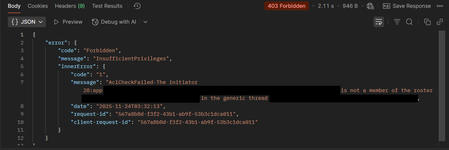
The error in your screenshot—"403 Forbidden" with "InsufficientPrivileges" and "AclCheckFailed-The initiator 28:app ... is not a member of the roster in the generic thread"—means the app (28:app...) isn’t recognized as a chat member and lacks permission to remove members, even with ChatMember.ReadWrite.All application permissions.
Root cause:
The app isn’t listed as a participant in the chat roster, so it doesn’t have the necessary rights to manage members.
Why this happens:
- App installation is required:
- For ChatMember.ReadWrite.WhereInstalled to work, the app must be added to the chat as a participant.
- Application permissions alone aren’t enough; roster membership is also needed.
- Application permissions might be limited:
- ChatMember.ReadWrite.All might not support removing members in every chat scenario.
- The Graph API may require the app to be installed or restrict member removal actions without user context.
- RSC (Resource-Specific Consent) permissions:
- RSC permissions only apply if the app is installed in the chat.
- If the app isn’t in the roster, RSC permissions won’t grant access.
How to resolve:
- Install the app in the chat (recommended)
When creating a chat, add the app in the installedApps section so it becomes a roster member:
POST https://graph.microsoft.com/v1.0/chats
Content-Type: application/json

{
  "chatType": "group",
  "members": [
    {
      "@odata.type": "#microsoft.graph.aadUserConversationMember",
      "roles": ["owner"],
      "user@odata.bind": "https://graph.microsoft.com/v1.0/users('user-id-1')"
    },
    {
      "@odata.type": "#microsoft.graph.aadUserConversationMember",
      "roles": ["owner"],
      "user@odata.bind": "https://graph.microsoft.com/v1.0/users('user-id-2')"
    }
  ],
  "installedApps": [
    {
      "teamsApp@odata.bind": "https://graph.microsoft.com/v1.0/appCatalogs/teamsApps/YOUR-APP-ID"
    }
  ]
}
- Try delegated permissions
- If application permissions don’t work, use delegated permissions with a service account that’s a chat member.
- Check app permissions in the manifest
Verify your Teams app manifest includes the necessary RSC permissions for chat member management:
"authorization": {
  "permissions": {
    "resourceSpecific": [
      {
        "name": "ChatMember.ReadWrite.Chat",
        "type": "Application"
      }
    ]
  }
}
References:
Create chat - Microsoft Graph v1.0 | Microsoft Learn
Remove member from chat - Microsoft Graph v1.0 | Microsoft Learn
Resource-specific Consent for Apps - Teams | Microsoft Learn
Please let us know if you face any further issue here.