Forum Discussion

Yet Another Conditional Formatting Query

Hi Clause9 ,
You can use the toLocaleDateString function to format a column in the date format of your locale.
=toLocaleDateString(@currentField)Make sure that your calculated column "NextReview" returns the data type "date".
Alternatively you can use the "getMonth", "getDate" and "getYear" functions to build your own format
=getMonth(@now)+1)+'.'+getDate(@now)+'.'+getYear(@now)
If you want to compare two dates you can use the "Number" function if you don't want to compare dates directly. It returns the number of milliseconds since ???
Number(@currentField)>Number(@now)
Best Regards,
Sven

Good old ChatGPT suggested using toLocaleDateString in the JSON, I tried it and it didnt work - it actually removed the conditional formatting that had worked.
Removed and saved back to JSON that uses toDateString. I still had the error so thought I'd add another calculated column to validate what the other columns were returning - when i added the column, all formatting started working "properly". Have now removed column and its still working..
Modern technology never fails to confuse me 🙂
- Clause9Jun 13, 2023Tin Contributor
Wow, even more confused now 🙂
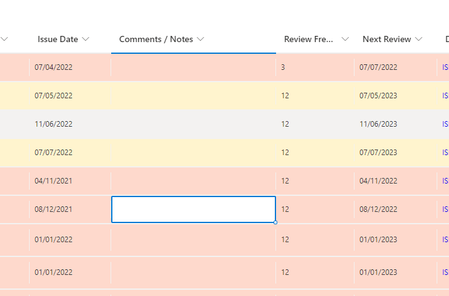
I closed my browser, cleared history and cache then reopened the list - formatting was perfect - rows with Next Review < today were in severeWarning, rows due in next 30 days were in Warning, all other rows were alternating no format / light grey. Happy days 🙂
I then did some work in another list before reopening the first - Aaaarrrggghhhh, the formatting is "broken" again. Here's code I'm using in Format View - grateful if anyone could debug and let me know what I've done wrong....
{ "$schema": "https://developer.microsoft.com/json-schemas/sp/v2/row-formatting.schema.json", "additionalRowClass": { "operator": "?", "operands": [ { "operator": "<=", "operands": [ { "operator": "Date()", "operands": [ { "operator": "toDateString()", "operands": [ { "operator": "Date()", "operands": [ "[$Next_x0020_Review]" ] } ] } ] }, { "operator": "Date()", "operands": [ { "operator": "toDateString()", "operands": [ { "operator": "Date()", "operands": [ "@now" ] } ] } ] } ] }, "sp-field-severity--severeWarning", { "operator": "?", "operands": [ { "operator": "<=", "operands": [ { "operator": "Date()", "operands": [ { "operator": "toDateString()", "operands": [ { "operator": "Date()", "operands": [ "[$Next_x0020_Review]" ] } ] } ] }, { "operator": "Date()", "operands": [ { "operator": "toDateString()", "operands": [ { "operator": "+", "operands": [ "@now", 2592000000 ] } ] } ] } ] }, "sp-field-severity--warning", { "operator": "?", "operands": [ { "operator": "==", "operands": [ { "operator": "%", "operands": [ "@rowIndex", 2 ] }, 0 ] }, "sp-css-backgroundColor-BgLightGray30", "sp-css-backgroundColor-noFill" ] } ] } ] } }- Clause9Jun 15, 2023Tin Contributor
Just to close this one out - I resolved by creating an additional calculated column, ReviewDue, that uses:
=TEXT([Next Review],"dd/mm/yyyy")to create the date in my preferred format. The original NextReview calculated column has been amended to:
=IF(ISNUMBER(VALUE([Review Frequency])),TEXT(DATE(YEAR([Issue Date]),MONTH([Issue Date])+[Review Frequency],DAY([Issue Date])),"yyyy/mm/dd"),"N/A")and hidden from the view. As a result, the conditional formatting logic works perfectly and the date is displayed in the format I want to see - having an extra hidden colun isn't a big issue.....