Forum Discussion

TobiasAT
Sep 08, 2016Steel Contributor
Wrong mail address in Access Request Settings
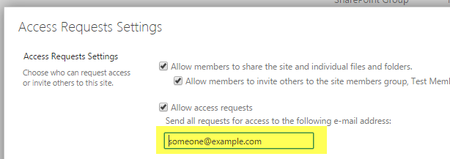
In SharePoint sites you have the option to define an email address in the Access Request options. The option is always enabled by default. Unfortunately with the static address someone@example.com. I...
- Sep 08, 2016
RequestAccessEmail property is supported in SharePoint Online. You can use the below PowerShell script to set the RequestAccessEmail.
$SiteUrl = "https://<TenantName>.sharepoint.com/sites/<Sitename>"
$UserName = "admin@<TenantName>..onmicrosoft.com"
$Password ="password"
$loadInfo1 = [System.Reflection.Assembly]::LoadWithPartialName("Microsoft.SharePoint.Client")
$loadInfo2 = [System.Reflection.Assembly]::LoadWithPartialName("Microsoft.SharePoint.Client.Runtime")
$loadInfo3 = [System.Reflection.Assembly]::LoadWithPartialName("Microsoft.SharePoint.Client.UserProfiles")
#$sstr = ConvertTo-SecureString -string $AdminPass -AsPlainText -Force
$Securepass = ConvertTo-SecureString $Password -AsPlainText -Force
$context = New-Object Microsoft.SharePoint.Client.ClientContext($SiteUrl)
$context.Credentials = New-Object Microsoft.SharePoint.Client.SharePointOnlineCredentials($UserName,$Securepass)
$Web = $context.Web
$AllProperties=$Web.AllProperties
$context.Load($Web)
$context.Load($AllProperties)
$context.ExecuteQuery()
$Web.RequestAccessEmail="alexd@<TenantName>.onmicrosoft.com"
$web.Update();
$web.Context.ExecuteQuery()

SanthoshB1
Sep 08, 2016Bronze Contributor
RequestAccessEmail property is supported in SharePoint Online. You can use the below PowerShell script to set the RequestAccessEmail.
$SiteUrl = "https://<TenantName>.sharepoint.com/sites/<Sitename>"
$UserName = "admin@<TenantName>..onmicrosoft.com"
$Password ="password"
$loadInfo1 = [System.Reflection.Assembly]::LoadWithPartialName("Microsoft.SharePoint.Client")
$loadInfo2 = [System.Reflection.Assembly]::LoadWithPartialName("Microsoft.SharePoint.Client.Runtime")
$loadInfo3 = [System.Reflection.Assembly]::LoadWithPartialName("Microsoft.SharePoint.Client.UserProfiles")
#$sstr = ConvertTo-SecureString -string $AdminPass -AsPlainText -Force
$Securepass = ConvertTo-SecureString $Password -AsPlainText -Force
$context = New-Object Microsoft.SharePoint.Client.ClientContext($SiteUrl)
$context.Credentials = New-Object Microsoft.SharePoint.Client.SharePointOnlineCredentials($UserName,$Securepass)
$Web = $context.Web
$AllProperties=$Web.AllProperties
$context.Load($Web)
$context.Load($AllProperties)
$context.ExecuteQuery()
$Web.RequestAccessEmail="alexd@<TenantName>.onmicrosoft.com"
$web.Update();
$web.Context.ExecuteQuery()

TobiasAT
Sep 12, 2016Steel Contributor
Thanks for the hint, works as it should.