Forum Discussion

Wrong mail address in Access Request Settings
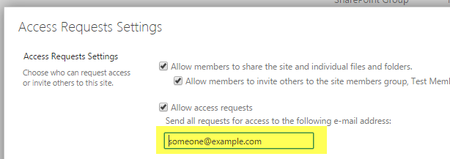
- Sep 08, 2016
RequestAccessEmail property is supported in SharePoint Online. You can use the below PowerShell script to set the RequestAccessEmail.
$SiteUrl = "https://<TenantName>.sharepoint.com/sites/<Sitename>"
$UserName = "admin@<TenantName>..onmicrosoft.com"
$Password ="password"
$loadInfo1 = [System.Reflection.Assembly]::LoadWithPartialName("Microsoft.SharePoint.Client")
$loadInfo2 = [System.Reflection.Assembly]::LoadWithPartialName("Microsoft.SharePoint.Client.Runtime")
$loadInfo3 = [System.Reflection.Assembly]::LoadWithPartialName("Microsoft.SharePoint.Client.UserProfiles")
#$sstr = ConvertTo-SecureString -string $AdminPass -AsPlainText -Force
$Securepass = ConvertTo-SecureString $Password -AsPlainText -Force
$context = New-Object Microsoft.SharePoint.Client.ClientContext($SiteUrl)
$context.Credentials = New-Object Microsoft.SharePoint.Client.SharePointOnlineCredentials($UserName,$Securepass)
$Web = $context.Web
$AllProperties=$Web.AllProperties
$context.Load($Web)
$context.Load($AllProperties)
$context.ExecuteQuery()
$Web.RequestAccessEmail="alexd@<TenantName>.onmicrosoft.com"
$web.Update();
$web.Context.ExecuteQuery()

RequestAccessEmail property is supported in SharePoint Online. You can use the below PowerShell script to set the RequestAccessEmail.
$SiteUrl = "https://<TenantName>.sharepoint.com/sites/<Sitename>"
$UserName = "admin@<TenantName>..onmicrosoft.com"
$Password ="password"
$loadInfo1 = [System.Reflection.Assembly]::LoadWithPartialName("Microsoft.SharePoint.Client")
$loadInfo2 = [System.Reflection.Assembly]::LoadWithPartialName("Microsoft.SharePoint.Client.Runtime")
$loadInfo3 = [System.Reflection.Assembly]::LoadWithPartialName("Microsoft.SharePoint.Client.UserProfiles")
#$sstr = ConvertTo-SecureString -string $AdminPass -AsPlainText -Force
$Securepass = ConvertTo-SecureString $Password -AsPlainText -Force
$context = New-Object Microsoft.SharePoint.Client.ClientContext($SiteUrl)
$context.Credentials = New-Object Microsoft.SharePoint.Client.SharePointOnlineCredentials($UserName,$Securepass)
$Web = $context.Web
$AllProperties=$Web.AllProperties
$context.Load($Web)
$context.Load($AllProperties)
$context.ExecuteQuery()
$Web.RequestAccessEmail="alexd@<TenantName>.onmicrosoft.com"
$web.Update();
$web.Context.ExecuteQuery()
 TobiasATSep 15, 2016Steel Contributor
The last days the property RequestAccessEmail was available and I could change the mail address. Since today I get always an error "Property 'RequestAccessEmail' cannot be found on this object; make sure it exists and is settable.". The property is not longer listed in the members. Can someone verify the issue, or is it just on my side?
- SanthoshB1Sep 15, 2016Bronze ContributorI have tried this in 2 tenants and it worked fine. Not sure what the problem may be. Can you able to perform this from this from Site Settings UI as in your screenshot?
- TobiasATSep 15, 2016Steel Contributor
Ok, found it. I used an old Microsoft.SharePoint.Client assembly, from version 15. The property RequestAccessEmail was added in CSOM version 16, see http://dev.office.com/blogs/new-sharepoint-csom-version-released-for-Office-365. I replaced the old assemblies with the DLLs from the SharePoint 2016 SDK. Now the property is visible.
- TobiasATSep 12, 2016Steel Contributor
Thanks for the hint, works as it should.