Forum Discussion

Anonymous
Aug 22, 2017Word 2016 Client Save Dialog - weird fonts
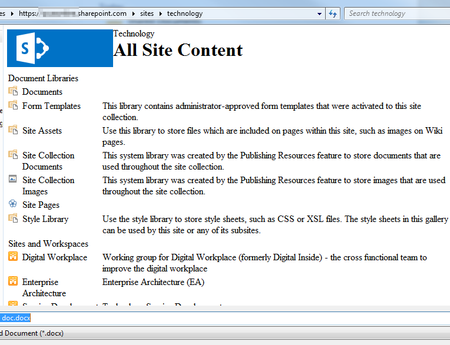
Has anyone seen this strange behaviour when you're using the Word 2016 client - when using the Save As dialog, browsing to a site all the fonts look odd.

Jan Steenbeek
Sep 04, 2017Copper Contributor
Ah, and noticing I should use google on "owssvr.dll corev4.css" gives another thread in which the same issue is diagnosed and a solution is proposed by a MS employee:
https://answers.microsoft.com/en-us/msoffice/forum/msoffice_word-mso_win10/formatting-in-office-2016-open-or-save-as-boxes/92ceef53-fa9b-4abc-bfa3-e3c7b87ecf47?auth=1
Anonymous
Sep 04, 2017ok, cool - thanks so much for that - superb digging...
I will check that out - from what I can tell it looks like the alternate CSS should be set in the master page rather than from that Design Manager configuration
I will check that out - from what I can tell it looks like the alternate CSS should be set in the master page rather than from that Design Manager configuration
- Jan SteenbeekSep 04, 2017Copper Contributor
Yes, that appears to be the proposed solution. Not a very nice one while we are trying to move past custom masterpages.
If you're already using custom master pages it's not that much of an issue. Otherwise we would look into adding a reference to the corev4.css inside our custom css.