Forum Discussion

Word 2016 Client Save Dialog - weird fonts
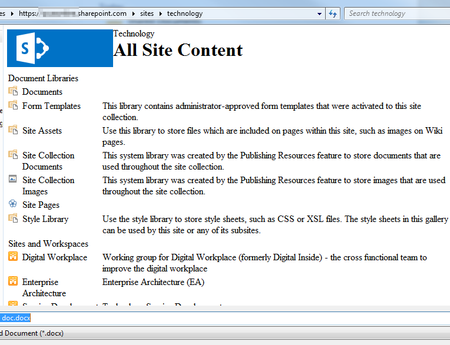

I was able to reproduce the issue by blocking the core4.css file, which is loaded from SharePoint by Word while rendering the 'save as' dialog.
For some reason this file is not loaded correctly in your environment. Most of the time this is related to not having your SharePoint site in the correct zone (ie Trusted Sites).
- Jan SteenbeekSep 04, 2017Copper Contributor
Did some further digging and we see the same issue in team sites that have been branded.
The issue is in the call to this URL which is executed by Word:
https://[tenant].sharepoint.com/sites/[sitename]/_vti_bin/owssvr.dll?dialogview=FileSave&FileDialogFilterValue=*.docx&location=
You can enter the same URL in your browser to replicate the issue.
The returned HTML contains no reference to corev4.css. Manually adding this to the response through gets you a correctly rendered page.
- AnonymousSep 04, 2017thanks, good spot! how would you "manually add this to the response" ?
Also do you reckon this is a bug and if so - where would I report this to Microsoft? - Jan SteenbeekSep 04, 2017Copper Contributor
Ah, and noticing I should use google on "owssvr.dll corev4.css" gives another thread in which the same issue is diagnosed and a solution is proposed by a MS employee:
https://answers.microsoft.com/en-us/msoffice/forum/msoffice_word-mso_win10/formatting-in-office-2016-open-or-save-as-boxes/92ceef53-fa9b-4abc-bfa3-e3c7b87ecf47?auth=1
- AnonymousSep 04, 2017Jan, I've gone through the steps now and have my Save As dialog windows looking a bit healthier :)