Forum Discussion

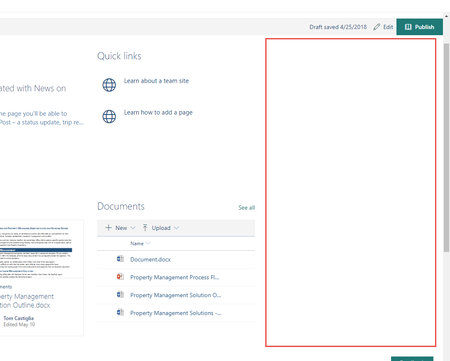
Why do modern pages leave so much white space?
- Jun 12, 2018
The amount of unused screen width actually depends on your screen resolution which is quite common for Web Applications I think. The larger your screen (resolution) the larger the amount of unused space there will be.
It would be nice though to have some "full-width" layouts available...


Hi there Tom Castiglia, use dark mode, then you won't see the white space! 🙂 That was me trying to be funny! 😉 Anyhow, there are many different ways to organize a Modern SharePoint page and part of the reason for the "white space" is that the pages are responsive, that the experience should be good to read whether you are reading the content from a pc, laptop, pad or phone. On the other hand, cramming a web page with lots of content is not good user experience, the content gets lost, as it is just too crowded.
Less is actually more when it comes to modern SharePoint pages, and modern communication. And, a beauty with SharePoint is that you can create as many pages as you like, and the pages can be scrollable.
If you don't want to scroll, and still have the information on the same page, you can jump to other sections of the page. To jump to different sections of a page you can use the Quick Link web part for adding shortcut to different parts of the same page. E.g. on the top part of a modern page, for instance below a hero webpart or on the right side of the page, I can link to different parts on the same page, that are located below the focus area (otherwise need to scroll to see it).
There is always a real estate battle deciding what should be on the top part of a page, as everyone want their stuff to be in focus. Rather organize content related to what the reader/user expect to find.
Actually on a web page you might just need to buttons; What I want to find and What I want to do, as someone visiting the page either want to find something or do something. Cater to that need first, then bring them on a journey.
And, you can use hero web parts, Quick links, news, event, and other web parts to bring the reader to other pages. Making it a pleasant journey.
You can also make several SharePoint sites and connect them via a SharePoint hub. Do also remember that there are different types of SharePoint, mainly SPO Team site (usually associated with Teams, still can also stand alone, still connected to a group (either Azure group or Microsoft 365 group) - typical way to see that it is a Team site, is that the link menu is to the left. The other type is SPO Communication site, where the link menu is on top and which is not associated with Teams or connected to a group. (This was the short explanation). Oh, and yes, OneDrive is also SharePoint, though without the pages.
I would recommend you to have a look at the SharePoint Lookbook to look at templates and examples of how SharePoint pages can be structured for different needs. I would be happy to chat with you as well if you want to brainstorm modern pages possibilities.
https://lookbook.microsoft.com/