Forum Discussion

Ole Bergtun
Jan 30, 2019Brass Contributor
validation date/time fails due to what???
Hi guys:) Quick and short question: got this date /time column with time and when i update it using my webpart it works nicely, but when user updates data using sharepoint form it fails take not...
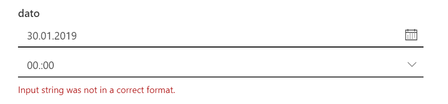
- Jan 31, 2019Hi, i don't have a fix - but a work around.
This works correct when i change the regional settings to english in such a way that the user was abel to alter or insert date and time without the validation stopping the update/insert.

Jens Balondo
Jan 30, 2019Brass Contributor
Also same Language (Land / Region)?

Ole Bergtun
Jan 30, 2019Brass Contributor
Hi jens, strange thing is that when i create a site in let say norwegian this happens, but when i then change regional settings to english then it works...
If i create the site in english then everything works as expected.
My thinking is that either way it should work.
O
If i create the site in english then everything works as expected.
My thinking is that either way it should work.
O
- Eva VogelJan 30, 2019Steel ContributorHi Ole! I think it’s because of JavaScript. Go create a PowerApp on that instead of the default Form, while you can use some formulas like FormatDateTime(utcNow(), „hh.nn“) for your Time fields and all other fields in your app. It’s much easier und it’s the future. Greets, Eva 😊
