Forum Discussion

Turn off 'You may also be interested in' web part
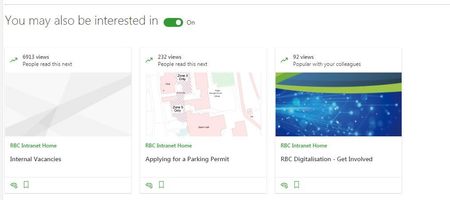

Michael Butterfield I'm guessing this may be an experimental feature ... maybe AB testing... I can't find it in any of my tenants. Very interesting though... i'd love to find out more.

Beau Cameron it showed up in my tenant today. You can turn it off on a page by page basis but I would love to be able to turn it off by site collection.
 Robin NilssonOct 01, 2019Bronze Contributor
Ryan Schouten I think you can do it in the site features - it hasn't shown up for my tenant yet but I have a task for testing this feature.
To disable SharePoint Recommendations on a site, you can do so through the SharePoint Features page:
Click on the Settings Cog Wheel -> Site information -> View all site settings -> Manage site features.
Go to SharePoint Recommendations and select "Deactivate".- Michael ButterfieldOct 02, 2019Iron Contributor
Thanks but I don't think that Manage site features page has any effect anymore, as it's a relic of the 'classic' SharePoint.
This annoying 'feature' is very much a modern web part thing, so it hasn't made any difference unfortunately.
- Robin NilssonOct 02, 2019Bronze ContributorI was kind of surprised as well that the solution for turning something off was the old site features, even though it was a modern thing, but it was a long description so I would have copy/pasted it. That's why I made a future task to check it - it was back in June sometime. I've got it marked as MC183456, so it may have come from there. Roadmap 52604.
 Johnny_TzanosOct 02, 2019Copper Contributor
Thanks! This seems to have worked for me. Although I still see the web part when the page is in Edit mode, after I publish it no longer shows up.
- Oct 01, 2019
Robin Nilsson The description looks like it would be the right one but I disabled the feature and it still shows up on the page.
