Forum Discussion

Site language issue
We created our SharePoint online site with the German language after that I would like to change the default language is English.
So I followed the following workaround:
https://www.c-sharpcorner.com/article/how-to-change-user-language-settings-in-sharepoint/
Its created alternative language only not changed the default language to English.
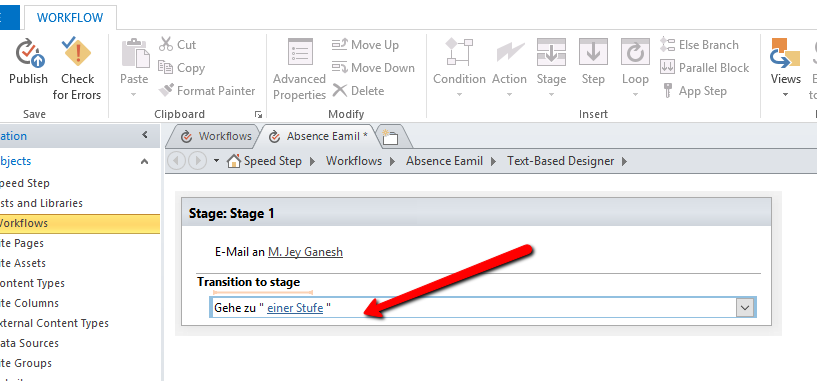
because if connect the SharePoint designer it shows the german language only.
So How to change the Default language for entire SharePoint site collections?
Now I have been looking and surfing to the last page of the internet and the only thing I can find that might help you is this workaround. Hope this helps to solve your need.
https://blog.devoworx.net/2016/07/16/change-workflow-actions-language-in-sharepoint-designer/
Regards, Magnus

4 Replies
- IanCaldwellIron Contributor
Jeyganesh correct, by design, you can never, ever change the language of your Office 365 tenant or any site once it is created. There are some uservoice requests to get this "feature" added. In my opinion, this is not a feature request, this is something that is broken. Language lock-in is not acceptable.
https://office365.uservoice.com/forums/273493-office-365-admin/suggestions/34841875-change-default-language-in-sharepoint-onedrive
https://sharepoint.uservoice.com/forums/329214-sites-and-collaboration/suggestions/30953740-change-the-default-language-after-the-sharepoint-s
- MagnusGoksoyrOLDProfileBronze Contributor
Jeyganesh as far as i know you cannot change it after it has been created.
 JeyganeshBrass Contributor
Is that any possibility to switch English from german on the SharePoint designer loading data?
- MagnusGoksoyrOLDProfileBronze Contributor
Now I have been looking and surfing to the last page of the internet and the only thing I can find that might help you is this workaround. Hope this helps to solve your need.
https://blog.devoworx.net/2016/07/16/change-workflow-actions-language-in-sharepoint-designer/
Regards, Magnus