Forum Discussion

"Site Content" and "Open with explorer" are showing different number of items for a Document lib
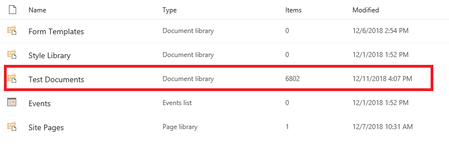

 john johnDec 11, 2018Steel Contributor
ChrisWebbTech wrote:
I would trust the SharePoint number more. But only thing that might be happening maybe some of your folders or files have illegal characters that windows doesn't read causing the mismatch. Or folders with permissions you don't have(assume your site collection admin on the site so wouldn't be the case).ChrisWebbTechthanks for the reply.. so you mean there might be files will illegal characters.. and those files will work well on sharepoint while can not be synced or viewed using windows explorer? if this is the case then is there away to get what are those files and folders?
second point. for the permission now i am login using the office 365 global admin, so i can view everything...
what are your thoughts,, as currently i am a bit confused, if i do have problem or not?
Note, not sure if it can help in understanding what is going on.. now the files inside the document library where saved inside a file share on windows server 2012, and i have used a third party tool named sharegate to migrate them, where the migration went smoothly without errors..
- Dec 11, 2018Global admin isn’t enough to see everything. You need to be the team group owner or explicitly set as site collection admin in order to see all files in the library. Make sure you have that permission and try again.
- john johnDec 12, 2018Steel Contributor
ChrisWebbTech wrote:
Global admin isn’t enough to see everything. You need to be the team group owner or explicitly set as site collection admin in order to see all files in the library. Make sure you have that permission and try again.yes i confirmed that the user i am using is the global admin + the site collection admin for the communication modern site (also this user created the site collection, so he was added as site collection admin by default). so i do not think there is any permission issues.. thanks
- Dec 11, 2018Also the hidden files in the library could not be taken into account in the Windows count...
- john johnDec 11, 2018Steel Contributor
jcgonzalezmartin wrote:
Also the hidden files in the library could not be taken into account in the Windows count...jcgonzalezmartin good point, but is there a way inside sharepoint to have a report of these hidden files? so the report might explain the gap between the 2 numbers which i am getting .....
second question. now in my case i chose to show hidden files inside explorer,, so will this still eliminate them from the explorer count ??
- Thuyavan GanesanDec 11, 2018Steel ContributorAlso, files that are not yet checked in will not appear in windows explorer count
- john johnDec 11, 2018Steel Contributor
Thuyavan Ganesan wrote:
Also, files that are not yet checked in will not appear in windows explorer countthanks for the reply,, now i can confirm that i do not have any checked out files, otherwise the migration tool would have raised an error.

