Forum Discussion

Site Collection error “We're still working on it and it might take 24 hours.”
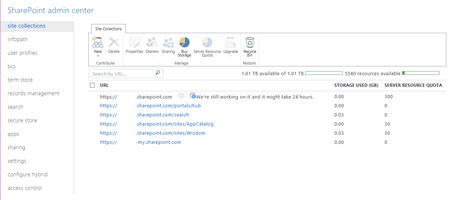


Like most companies we wanted a fresh new root site collection with no data. When we created the new root site collection it showed the publishing portal template as an available template. The issue is you cannot use the publishing portal template as the root site collection template. Microsoft should clearly state you cannot use the publishing portal template. even better remove it when creating a root site collection.
We now are back up and running with no help from your very, very unhelpful replies.

Glad you were able to solve the issue by yourself...AFAIK, the root site collection in any SPO tenant has no data so not sure what you mean by "a fresh new root site collection"...the site collection has not any kind of data...if you mean the template applied by Microsoft does not what you need, this is a different story. Being said that, I would like to know how you would advice your customer or your company to solve issues related to deleting root site collection in a SPO tenancy bearing in mind that Microsoft trends to release stuff to that root site collection such as the SPO landing page from where each user can see the list of sites he has been frequently using, create new sites or just news...have not tried myself to see what happens if I delete the root site in regards of the Home page because most companies are agree to create fresh site collections under /sites path
And last but not least, I recommend you to be more polite and less rude when someone tries to comment on a problem you can have when dealing with Office 365. This is a free community to get help, share experiences and problems and where respect is an important element...so if a comment does not help, simply say: I does not help.
 Vassilios PallisJun 08, 2018Copper ContributorSee this to learn something
https://social.technet.microsoft.com/Forums/en-US/bb8e165b-df47-457c-af87-a02754b4c982/spo-root-site-recreation?forum=onlineservicessharepoint Ethicore AdminJun 07, 2018Copper ContributorJuan Carlos, the root site doesn't have data but has settings which can be corrupt or messed up like it was in my case.
 DanielClaassenJun 07, 2018Brass ContributorHi, I'm in the same situation.
One of our team members had this issue and also was trying to create a Publishing portal.
Since that, I tried to clean out my test tenant and start off clean. So deleted my root site and I'm trying to recreate a normal Team site.
I agree, if you are not allowed to have a root site as a publishing portal why give the option?
The team site im trying to recreate also now give's me "We're still working on it and it might take 24 hours." Started about 14hours ago...
Found a different thread where you can use some PowerShell to delete from Recycle bin or something like that...Might try that if i get a gap. sp_me1Mar 14, 2019Copper ContributorNot true. I have installed multiple SharePoint intranets (classic). Every single time I start by deleting the root site collection and use publishing template to recreate it. Go on and have a look. You will not see that many third party Intranets with a team site template.Now I would like to know why this problem happens. I have encountered this exactly two times. The first time this problem happened it took a week until a new publishing site was provisioned. I did create a support ticket but I doubt that did the trick.