Forum Discussion

Silly Q - Accidentally Hid the Toolbar
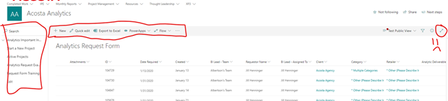

JillAcosta This is exactly what we are seeing. If it's the same problem, then you used the 2 arrow icon on the top right of the command bar to expand the list and hide the left nav/site header. In our tenant, something is wrong with that functionality because the command bar is also hidden - there's no way to go back... I have another tenant where it works just fine.
I've used List settings to create new view (or look at an old one), and going to that view still leaves the list in expanded mode.
I've opened a ticket with support but no news yet.
The only way I've been able to get the list back (not for a general user), is to clear all cookies/settings (in Edge I just clear the ones under <tenant>.sharepoint.com, then refresh the page and sign in again.
- Feb 10, 2020I cannot reproduce, wonder if it's a build running through on a few tenants causing it?
- Robin NilssonFeb 10, 2020Bronze ContributorI'm thinking so, but wanted to report it since the roadmap was officially marked 'launched' Figured it should be out there if they did that. My other tenant is fine, and the test tenant the MS tech used was fine as well. So they're looking at it as a new feature and tenant specific problem. Though I'm a little glad someone else has seen it (sorry Jill 🙂 )
