Forum Discussion

Sharing SITES
- Sep 27, 2023
Hi gmj12345,
thanks for the Update, your last info was important.
As far as I know Microsoft 365 Business Basic does not natively support anonymous sharing.
To share SharePoint documents or sites with anyone outside your organization without requiring recipients to sign in with a Microsoft or organizational account, you will need to purchase an add-on license or upgrade to a higher-tier Microsoft 365 plan.Here is a short table comparing the external sharing capabilities of different Microsoft 365 plans:
Plan Anonymous sharingMicrosoft 365 Business Basic No Microsoft 365 Standard Yes Microsoft 365 Premium Yes Microsoft 365 Enterprise Yes SharePoint Online Plan 1 Yes SharePoint Online Plan 2 Yes
Please click Mark as Best Response & Like if my post helped you to solve your issue.
This will help others to find the correct solution easily. It also closes the item.If the post was useful in other ways, please consider giving it Like.
Kindest regards,
Leon Pavesic (LinkedIn)

Same result 😞
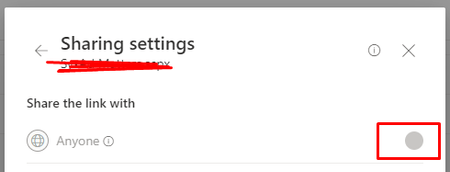
This is where I did my first my modification to do the external sharing
By the way I am using M365 Business Basic would that affect?
I have been troubleshooting this for four days already anymore suggestions 🙂
Thanks for your suggestions. LeonPavesic

Hi gmj12345,
thanks for the Update, your last info was important.
As far as I know Microsoft 365 Business Basic does not natively support anonymous sharing.
To share SharePoint documents or sites with anyone outside your organization without requiring recipients to sign in with a Microsoft or organizational account, you will need to purchase an add-on license or upgrade to a higher-tier Microsoft 365 plan.
Here is a short table comparing the external sharing capabilities of different Microsoft 365 plans:
| Microsoft 365 Business Basic | No |
| Microsoft 365 Standard | Yes |
| Microsoft 365 Premium | Yes |
| Microsoft 365 Enterprise | Yes |
| SharePoint Online Plan 1 | Yes |
| SharePoint Online Plan 2 | Yes |
Please click Mark as Best Response & Like if my post helped you to solve your issue.
This will help others to find the correct solution easily. It also closes the item.
If the post was useful in other ways, please consider giving it Like.
Kindest regards,
Leon Pavesic (LinkedIn)