Forum Discussion

Toby McDaid
Aug 02, 2019Iron Contributor
"Sharing failed: value cannot be null" when trying to share a site with an external user?
We're attempting to share one of our SharePoint sites with an external user and I'm currently just doing some testing with my own personal email address. Everything has been configured correctly ...
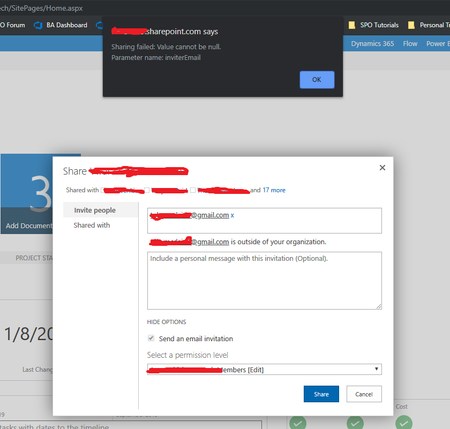

Aug 02, 2019
You could check that, but usually it wouldn't allow you to even put it in there and wouldn't check names properly. Have you tried another address? Maybe something specific to your account there and it being in the tenant or something already causing issue. Try sending to another address you may have that you haven't used before.

Toby McDaid
Aug 05, 2019Iron Contributor
Hi Chris,
I've done a number of tests now, trying it on two different site collections and using three different external email addresses. I even created a new email address with a random name, just in case the permissions were conflicting in some way to my Office 365 admin account which uses the same name.
I've done a number of tests now, trying it on two different site collections and using three different external email addresses. I even created a new email address with a random name, just in case the permissions were conflicting in some way to my Office 365 admin account which uses the same name.
- Rob EllisAug 05, 2019Bronze Contributor
Does the account you are logged into SharePoint as (the one doing the inviting) have an email address / mailbox?
- Toby McDaidAug 05, 2019Iron ContributorHi Rob,
I've just tried using a different O365 account to my admin one, looks like the sharing is now working okay. However, the external email addresses I'm sharing with don't receive any email invitation, despite me ticking the 'send email invite' option.
Even if I use the external email address to try and access the site without accepting any kind of invite, Office 365 just says it doesn't recognize the account.- Rob EllisAug 05, 2019Bronze ContributorFor the external email account, check the Junk / spam / etc - the automatic email sometimes ends up there.
Also, check in Azure AD to make sure the guest account has been invited - https://portal.azure.com/#blade/Microsoft_AAD_IAM/UsersManagementMenuBlade/AllUsers
