Forum Discussion

Robert Woods
Oct 21, 2018Steel Contributor
SharePoint publishing site using modern layout - can i remove left nav?
I have converted an older SharePoint Publishing site to the modern UI. I would like to reclaim the space on the left hand side that is used by the quick launch. I have tried disabling quick launch...
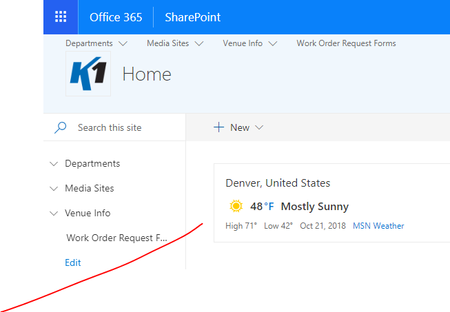
- Oct 21, 2018Not yet. They are adding this ability by end of year I believe.


Anonymous
Oct 28, 2018Not applicable
Have you tried removing all the items from the navigation? When I do that in my tenant it hides the left hand navigation. Personally I think it throws the page design off not having it, it is whatever works best for you and your users :-)

Robert Woods
Nov 06, 2018Steel Contributor
That wont work on this site for some reason, I believe due to being a publishing site. I did do this on a new modern team site and I see what you mean about throwing the page design off. Its pretty funky.
- FromelardNov 07, 2018Steel Contributor
Hi,
I had the same case in mine and the solution I found is to change the local left navigation to use the internal level navigation.
When it's done I clicked on Edit and removed all the menu items.
Now when that home page is loading the left navigation is empty and the page layout is sliding automatically to remove the left menu object.
You can probably find also the CSS Object and put into your modern page some JS code masking that object.
Fab
