Forum Discussion

SharePoint Online share feature won't auto-complete Groups
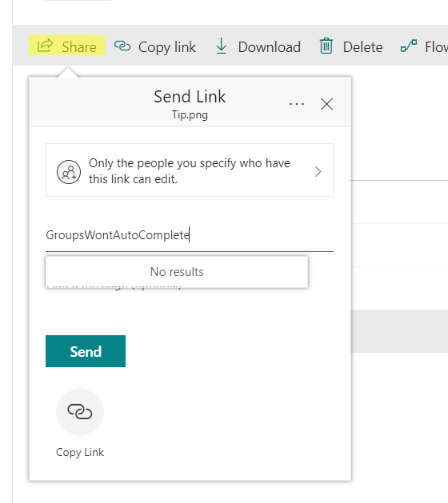

Thanks Vasil,
That is promising and led me to have a closer look. The groups types I was using that do not auto-complete in SharePoint's primary share screens are;
- "SharePoint Groups" at the site collection level
- and "Office 365 security groups".
- Synchronized AD security groups
- Office 365 distrubution lists
The following types of groups do auto-complete in the primary sharing screens of Sharepoint
- Office 365 Groups
- Office 365 Mail enabled security groups
I'm not sure why this is inconsistent or whether it is configurable but I have a way forward by choosing the type that works. For the types that work only via information panel \ manage access there are differences too - in whether the person is notified of the share or not.
Thanks
Julian

That's the expected behavior, SharePoint's sharing functionality requires both email (to send the invite) and security-enabled object (so that permissions can be stamped on it), thus it only works with mail-enabled security groups and now Office 365 Groups.
 Anders ErikssonSep 14, 2018Copper Contributor
The strange thing is that it used to work and suddenly stopped, at least for us and our customers tenants. I could previously get autocomplete for Office 365 groups when sharing from SharePoint but not anymore.
- Sep 15, 2018
I agree here with Anders and I have not noted this before, but the sharing feature should also work with SharePoint Groups as It did in the past...the "old" sharing dialog allowed to share with SharePoint Groups and behind the scenes, the sharing functionality just managed all the stuff to send the sharing e-mail to the users / e-mail enabled security groups added to the SharePoint Group...so to me, this is clearly a step back when sharing information in SPO. StephenRice any hints here?
- StephenRiceSep 17, 2018
Microsoft
Hi all,
VasilMichev is correct. Clicking "Share" (or copy link) indicates that you want to to send a link to the file to some e-mailable object (and to some object that we can add to the permissions). SharePoint groups are not e-mailable so we exclude them from the results there.
That being said, we certainly know that users want to be able to do this! If you open up the details pane and click on the "add People" button. That should bring up the "Grant Access" dialgoue (freshly re-done!) which fills the same role as the classic "Invite People" dialogue. You should be able to share with SharePoint groups here. If not, please let me know!
Stephen Rice
OneDrive Program Manager II

