Forum Discussion

Sinan621
Mar 02, 2020Copper Contributor
Sharepoint Online, number column NOT aligned right
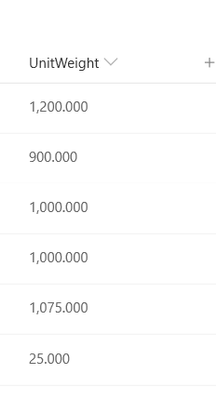
Hello, i have a sharepoint online custom list with number column(s) with decimals and thousands separator. As far as I understand, numbers should be aligned right by default? However in my c...
 Mar 04, 2020
Yes, you need to replace the formula:
=TEXT([Column],"###,###.00")
This type of modification doesn’t have any impact on the original column
Thanks

Mike_Honey
Feb 05, 2021Brass Contributor
Sinan621 - my tests so far are regular number columns, so it can work. Sorry it didn't work for you. .displayValue is mentioned on this page:
https://docs.microsoft.com/en-us/sharepoint/dev/declarative-customization/column-formatting
If I find out more I'll post back here.

Hiker10
Mar 27, 2021Copper Contributor
I have a calculated column of dollar amounts. In the data type returned from this formula, I've selected currency. How can I have my column, right align, with $ sign, and thousands commas, stay in tact? I have chosen 0 decimal points.
Thank you!

- Mike_HoneyApr 21, 2021Brass ContributorHiker10 - did you try my example above? It should work in your scenario.