Forum Discussion

Sharepoint Online, number column NOT aligned right
 Mar 04, 2020
Yes, you need to replace the formula:
=TEXT([Column],"###,###.00")
This type of modification doesn’t have any impact on the original column
Thanks
Hi
Default Sharepoint aligns left!
If you want to align the text to the right, you should copy the following code and paste it in the
JSON Formatting to Customize
{
"$schema": "https://developer.microsoft.com/json-schemas/sp/column-formatting.schema.json",
"elmType": "div",
"style": {
"display": "table",
"width": "100%"
},
"children": [
{
"elmType": "div",
"txtContent": "@currentField",
"style": {
"display": "table-cell",
"text-align": "right",
"vertical-align": "middle"
}
}
]
}
Thanks
 Sinan621Mar 03, 2020Tin Contributor
Many thanks for your quick reply!
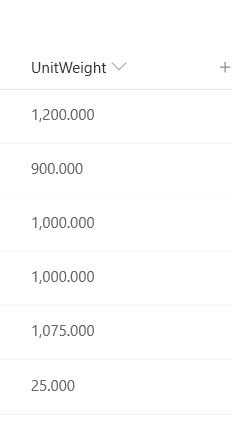
I copy/pasted your solution. Result is that the numbers are now aligned right but I lost the thousand separator and decimals with zeros (not showing). See screen shot below.
Basically it looks like numbers are converted into text? Is there a solution to align right AND keep the number formatting including thousand separator and number decimals for all rows?
I feel like we are almost there... 🙂
Cheers
- FabioO365GoDMar 04, 2020Brass Contributor
I'm sorry but it takes more steps!
Sharepoint doesn't have the possibility to set decimal numbers.
As first thing to do you need to create a column, computed with the following formula:
=TEXT([column],".00")
Then insert the following code
{
"$schema": "https://developer.microsoft.com/json-schemas/sp/column-formatting.schema.json",
"elmType": "div",
"style": {
"display": "table",
"width": "100%"
},
"children": [
{
"elmType": "div",
"txtContent": "@currentField",
"style": {
"display": "table-cell",
"text-align": "right",
"vertical-align": "middle"
}
}
]
}Thanks
- Sinan621Mar 04, 2020Tin Contributor
Again, many thanks for taking time to help me with my question. I tried it and it is very close. The only missing part is now the thousand separator: Is that possible?
And will I be still able to make number calculations with this type of column?
Cheers
Sinan
