Forum Discussion

Sharepoint online list column formatting
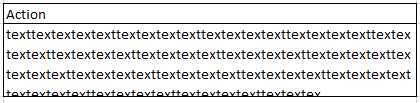
So, I've been having this problem for a while now, and I think the solution should be very basic, but still I could not figure it out. I have a list in which there is a column 'Action'. This column is set to text type, but I can't properly format it the way I wanted. What I would like is the column height and width to be fixed at x ppx with the text formatting to be like picture 2 (text being cut in downwards). But I only manage to get the column to show as picture 1 text being cut upwards). Is there any way to achieve this? I've tried it with align-left and top-align, but with no success.
-- https://imgur.com/mjWImcL
-- https://imgur.com/OREEh32
FYI, this is the formatting code I'm using for the column 'Action' right now:
{
"$schema": "https://developer.microsoft.com/json-schemas/sp/column-formatting.schema.json",
"elmType": "div",
"txtContent": "@currentField",
"style": {
"min-height": "70px",
"max-height": "100px",
"scroll-behavior": "unset"
}
}

1 Reply
 ellan1537Iron ContributorIf you're using modern experience, then try with below:
{
"$schema": "https://developer.microsoft.com/json-schemas/sp/column-formatting.schema.json",
"elmType": "div",
"txtContent": "@currentField",
"style": {
"min-height": "100%",
"max-height": "100%",
"scroll-behavior": "unset"
}
}