Forum Discussion

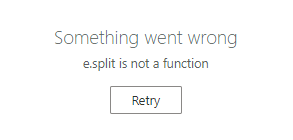
Sharepoint Online error when editing a listitem e.split is not a function
 Nov 06, 2024
Hello Ahanney, I'm sure you have solved this a long time ago, but for others who may come by this thread... I encountered this very issue today and, in my case, it was a brand-new list created from an Excel document. I had several columns that I set the type to be Choice. The import did a good job at keeping the values but did not populate the choices. Once I set all the choice options for all the choice columns this problem went away. So, check your choice column settings or possibly any special columns you may have as they are likely the source of the problem. Good Luck!


- AhanneyJul 04, 2023Tin Contributorsome more detail, the SharePoint list has just over 100 rows. On 80% of rows I get the error above when I double click to edit, the other 20% edit fine. I cannot see any discernable pattern to tell me why the 20% work. This is a very frustrating error.
- AhanneyJul 05, 2023Tin Contributor
I have been able to reproduce the error. Open a SharePoint online list. Switch it to edit view, it works fine. Close the browser and open the list again in a new browser instance. Switch to edit view, the error occurs. If you clear the cookies, it works. So I think there is some session related error regarding the cookies, and authentication to MS.
It is the same in Chrome (114.0.5735.110) and in Edge (114.0.1823.43) . As I say, the workaround is to clear cookies, but that is not practical as this list is used by production teams several times a day.