Forum Discussion

SharePoint Online - Validation Settings missing from a list

Radoslavov91
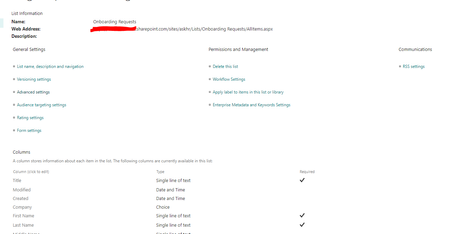
I had the same problem. You need full access to your Sharepoint List. I assume your SP list is connected to a Team in MS Teams? When you set yourself as an owner of the team you get full permission automatically.
Or maybe you can set yourself as owner from your SP List´s settings. With full permissions you will see "Validation Settings"

You can also try using the direct URL in below format to access list validation settings:
https://contoso.sharepoint.com/sites/siteName/_layouts/15/VldSetng.aspx?List=%7BCD15019F%2DA87B%2D44C4%2D9682%2DF066AC1F28CF%7D
Where anything after List= is the GUID of list which you can get from list settings page like:
Try using account with Full Control permissions at list level.
Please click Mark as Best Response & Like if my post helped you to solve your issue. This will help others to find the correct solution easily. It also closes the item. If the post was useful in other ways, please consider giving it Like.