Forum Discussion

WeeTeckTan
Sep 05, 2018Iron Contributor
SharePoint Online - MS Word Preview - Document Property Value is not display (Doc template)
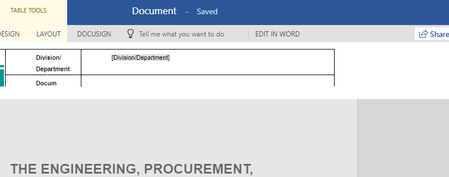
Dear All, My custom document template (header) using Quick Part to display the metadata value but the system can't show the value during Word Online. Any reason or does it the limitation or bug? ...
- Sep 05, 2018Not such a specific comparison, but here you can find one provided by Microsoft: https://support.office.com/en-us/article/differences-between-using-a-document-in-the-browser-and-in-word-3e863ce3-e82c-4211-8f97-5b33c36c55f8


Sophocrat
Feb 28, 2019Copper Contributor
It would be a useful feature to add for Sharepoint users: a properties pane that opens on the right (exactly like the SharePoint one in a documents list), when the document is created.
Currently when I create a new document from a Word template in SharePoint, it opens automatically in Word Online. To change the properties I have to close it, then edit the document properties in the SharePoint list, or open in Word. I'd prefer to set the properties immediately, when the document opens, and start editing it without the extra step.