Forum Discussion

SharePoint Online - "enter a date like this error" message
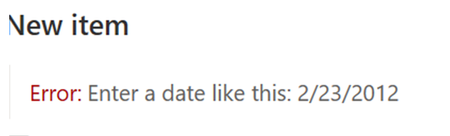


I did not. I just deleted the date column and started using a single line text column instead 😐
If you figure it out, please reply back here
 aleksanderpuntervoldAug 12, 2021Copper Contributor
Someone, please find a solution to this! A colleague asked me yesterday to look at it, as she was having trouble using the date picker when adding a new item in a SP list. I did not have the same problem, and tried various solutions with no luck. Regional settings in SP, on the computer, in Office, Sharepoint Admin settings ++. Today another colleague contacted me and experienced the same. However, now I also had this issue. Seriously..?!
- aleksanderpuntervoldAug 12, 2021Copper Contributor
UPDATE!
Everything works fine when inputting new list element with the sharepoint mobile phone app. I then tried Edge browser (Chrome is my default), but same problem here with incorrect date format. Then, for the hell of it, I tried explorer. It had correct date format there! I then checked my Chrome regional setting and language, and everything seems fine...?! However, when I changed from Norwegian to Danish and relaunched Chrome, the date field in SP worked! Going back to Norwegian messed it up again. There must have been some error in the Chrome update with language packs and formats...?? Jens SkovMar 22, 2022Tin ContributorI have this problem with a sigle user. She can enter the date with dashes ("-") and it will work, but neither . og / works. With my user, The data picker also return 22.3.2022 for today, as it does on hers, but mine is accepted (Btw it's all in Danish here)