Forum Discussion
Sharepoint List Export selected
Beutebaer you would need to have another column, most likely a Yes/No column called Export, where you select Yes for the items that you want to export. Create a new view of the list and name it Export and apply a filter of Export is equal to Yes. Then when you view the Export view you can click the Export link and it will just export those items.
Rob
Los Gallardos
Intranet, SharePoint and Power Platform Manager (and classic 1967 Morris Traveller driver)
- BeutebaerMay 08, 2023Copper Contributor
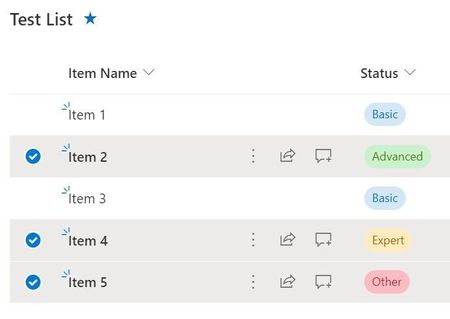
Dear RobElliott, thank you for your reply, but this is not really comfortable. After selecting e.g. 60 of 100 items, i have to deselect 60 of 100 again after export - or i am wrong? I do not understand Microsoft - the blue dot in front of the line is to select one or more item(s), why is it not possible to export only selected ones?
Thorsten (Beutebaer)
- BeutebaerMay 08, 2023Copper ContributorI think, what i really need is a shopping system, where i can select my favorite items and put them in a cart to handle them otherwise.. 😉
This would be nice!