Forum Discussion

SharePoint list edit form button
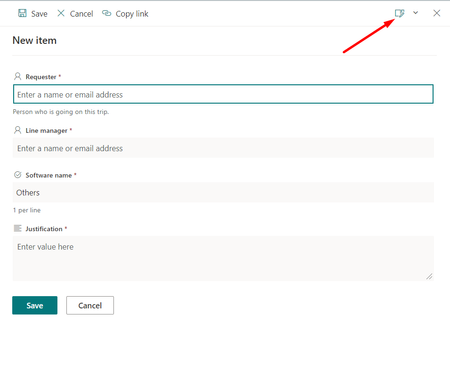

Hi ganeshsanap
Thank you for reply this post.
- Is this list located on same site? Nope.
- Is it a modern generic list or is it created from any classic experience list template? It's a classic experience list template.
Is it possible can make the button appear in my generic list?
Thank you.
Sk-73

Sk-73 Which classic list template you used to create this list?
I can see the "Edit columns" option in generic (modern experience) list in classic SharePoint team site.
Please click Mark as Best Response & Like if my post helped you to solve your issue. This will help others to find the correct solution easily. It also closes the item. If the post was useful in other ways, please consider giving it Like.
- Sk-73Dec 14, 2021Iron Contributor
It's the "issue tracker" classic list template.
I just try on the other site to create a new blank list, I can see the edit column button as well.

How do I create a new list please see the below.
For some reason, there's have one site the list doesn't have the "Edit column" button, hmm... strange...
- ganeshsanapDec 14, 2021MVP
Sk-73 I have a list created from "Issue Tracker" list template & I can see the Edit columns option in this list:
Raise a support ticket with Microsoft if needed. check Online support
Please click Mark as Best Response & Like if my post helped you to solve your issue. This will help others to find the correct solution easily. It also closes the item. If the post was useful in other ways, please consider giving it Like.