Forum Discussion

SharePoint List Column Formatting Button Dropdown Select Possible?
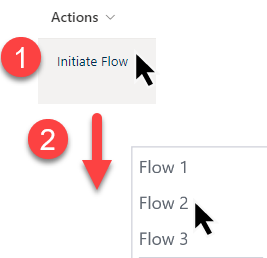
- Apr 18, 2024
Denvermartin no, you would need to have 3 columns, each a single of text column with a JSON-formatted button in each that triggers the relevant flow.
Rob
Los Gallardos
Microsoft Power Automate Community Super User.
Principal Consultant, SharePoint and Power Platform WSP Global (and classic 1967 Morris Traveller driver)

Denvermartin no, you would need to have 3 columns, each a single of text column with a JSON-formatted button in each that triggers the relevant flow.
Rob
Los Gallardos
Microsoft Power Automate Community Super User.
Principal Consultant, SharePoint and Power Platform WSP Global (and classic 1967 Morris Traveller driver)

Rob_Elliott One work around that's not a dropdown list, but you can have multiple buttons in a cell if you aren't wanting to create multiple columns.
{
  "$schema": "https://developer.microsoft.com/json-schemas/sp/column-formatting.schema.json",
  "elmType": "div",
  "style": {
    "display": "flex",
    "flex-direction": "row"
  },
  "children": [
    {
      "elmType": "button",
      "customRowAction": {
        "action": "executeFlow",
        "actionParams": "{\"id\":\"INSERT FLOW CODE HERE\",\"option\":\"Option 1\"}"
      },
      "attributes": {
        "class": "ms-fontColor-themePrimary ms-fontColor-themeDarker--hover"
      },
      "style": {
        "border": "none",
        "background-color": "transparent",
        "cursor": "pointer"
      },
      "children": [
        {
          "elmType": "span",
          "attributes": {
            "iconName": "FolderHorizontal"
          },
          "style": {
            "padding-right": "6px"
          }
        },
        {
          "elmType": "span",
          "txtContent": "Add a folder"
        }
      ]
    },
    {
      "elmType": "button",
      "customRowAction": {
        "action": "executeFlow",
        "actionParams": "{\"id\":\"INSERT FLOW CODE HERE\",\"option\":\"Option 2\"}"
      },
      "attributes": {
        "class": "ms-fontColor-themePrimary ms-fontColor-themeDarker--hover"
      },
      "style": {
        "border": "none",
        "background-color": "transparent",
        "cursor": "pointer"
      },
      "children": [
        {
          "elmType": "span",
          "attributes": {
            "iconName": "Edit"
          },
          "style": {
            "padding-right": "6px"
          }
        },
        {
          "elmType": "span",
          "txtContent": "Edit"
        }
      ]
    }
  ]
}
And if that's not an option, then use power apps to customize a form?