Forum Discussion

addy2020
May 23, 2022Tin Contributor
Sharepoint List Choice Field not showing selected Value
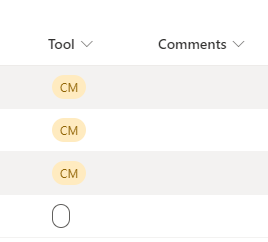
Choice column has text choices but when selected instead of showing the value its showing oval shape while when viewed separately it shows that value. Anyone has any clue why this is happening L...

OldWarwick
May 23, 2022Bronze Contributor
This is list column formatting, do the drop down and Tool > and Format Column to edit settings.
Looks like you have a blank selection which is formatted to show as the black outline
Looks like you have a blank selection which is formatted to show as the black outline

addy2020
May 23, 2022Tin Contributor
As you can see in 2nd screenshot it is not a blank selection, selected value 'CM' can be seen when item is viewed. Also under Tool>>Format Column, I tried all three of them Tool column still showing blank value.
- OldWarwickMay 24, 2022Bronze Contributorok everything looks ok, maybe change to another selection then change back to try and refresh it.
- addy2020May 24, 2022Tin Contributor
Manually changing works but manually changing is not a requirement here as this is supposed to be updated by Powerapps app. Moreover I have deleted that list & created a new one & its working fine there. But I feel concerned for those who would ever face this issue & who can't delete & create a new List like me.
No sure if that was a bug or not but if it is hopefully they would find it fix it. If I face it again will raise it for sure.
- OldWarwickMay 24, 2022Bronze ContributorI see random things like this occasionaly, usually they resolve themselves quickly, sometimes it's quicker to rebuild as was the case for yourself