Forum Discussion

Sharepoint list - highlight a number in column if less than a number in another column
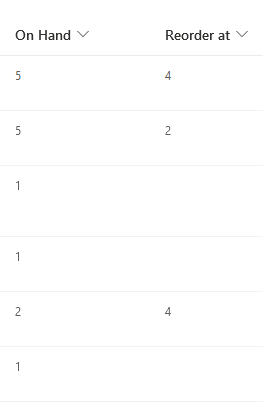

hgg48 you can do this with JSON column formatting. Format the OnHand column, select Advanced Mode and add the following:
{
  "$schema": "https://developer.microsoft.com/json-schemas/sp/column-formatting.schema.json",
  "elmType": "div",
  "txtContent": "@currentField",
  "style": {
    "color": "=if([$OnHand] <= [$ReorderAt], 'red', 'green')",
    "font-weight": "=if([$OnHand] <= [$ReorderAt], 'bold', 'normal')"
  }
}
The result is:
Rob
Los Gallardos
Intranet, SharePoint and Power Platform Manager (and classic 1967 Morris Traveller driver)

RobElliottThank you very much for the quick reply, very much so appreciate it. I tried adding what you wrote into the advanced mode editor but the numbers in the OnHand column show up as all green for me. Can you please tell me what I did wrong? Thanks!
- RobElliottDec 29, 2021Silver Contributor
hgg48 in your list settings check what the internal name is. In my columns I didn't use spaces in the column name - I never do - whereas you might have spaces in your column name. So check that and use the internal column name in your JSON column formatting.
Rob
Los Gallardos
Intranet, SharePoint and Power Platform Manager (and classic 1967 Morris Traveller driver)- hgg48Dec 29, 2021Copper ContributorIt looks like I did create the columns with internal names containing spaces. I tried to put spaces in the JSON column formatting to reflect the internal name of On Hand and Reorder At but the columns just turned all blank. Is there a special way I need to handle spaces? Thank you for your continued help.
- RobElliottDec 30, 2021Silver Contributor
hgg48 you need to use _x0020_ in place of each space (and this is also shown in the Field= in List Settings). So your JSON code would look like this:
{
  "$schema": "https://developer.microsoft.com/json-schemas/sp/column-formatting.schema.json",
  "elmType": "div",
  "txtContent": "@currentField",
  "style": {
    "color": "=if([$Current_x0020_Stock] <= [$Order_x0020_More], 'red', 'green')",
    "font-weight": "=if([$Current_x0020_Stock] <= [$Order_x0020_More], 'bold', 'normal')"
  }
}
Or you could use the @currentField as follows which gives the same result:
{
  "$schema": "https://developer.microsoft.com/json-schemas/sp/column-formatting.schema.json",
  "elmType": "div",
  "txtContent": "@currentField",
  "style": {
    "color": "=if(@currentField <= [$Order_x0020_More], 'red', 'green')",
    "font-weight": "=if(@currentField <= [$Order_x0020_More], 'bold', 'normal')"
  }
}
Rob
Los Gallardos
Intranet, SharePoint and Power Platform Manager (and classic 1967 Morris Traveller driver)