Forum Discussion

SharePoint doesn't update holiday calendars in a new view
- Aug 09, 2022
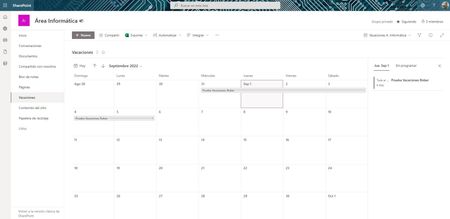
RobertoOlmo I am unable to reproduce this issue on my SharePoint site. I just tried creating a item in calendar view starting on 31st Aug & ending on 5th September and it is shown properly in calendar view on first time page load:
- Is this calendar web part set as default view of list?
- Can you try clearing browser cache once?
Related articles:
Please click Mark as Best Response & Like if my post helped you to solve your issue. This will help others to find the correct solution easily. It also closes the item. If the post was useful in other ways, please consider giving it Like.

RobertoOlmo I am unable to reproduce this issue on my SharePoint site. I just tried creating a item in calendar view starting on 31st Aug & ending on 5th September and it is shown properly in calendar view on first time page load:
- Is this calendar web part set as default view of list?
- Can you try clearing browser cache once?
Related articles:
Please click Mark as Best Response & Like if my post helped you to solve your issue. This will help others to find the correct solution easily. It also closes the item. If the post was useful in other ways, please consider giving it Like.
 RobertoOlmoAug 24, 2022Copper ContributorHello:
After being able to verify it, it indeed seems that the solution is to clear the cache (both in the browser and in Teams, which was where the problem was giving us).
I would only have one question: Is it possible to automatically clear the Teams cache? The solution that I have found on the internet is to delete the contents of the folder "%appdata%\Microsoft\Teams"- RobertoOlmoAug 11, 2022Copper ContributorSorry for the late response... I've tried what you say and it may be a reason. Indeed, the PC that happens to me is a PC that I never turn off, so the cache is not deleted. I have tried to access from another computer and it does appear. However it is a mistake that happens to many more people in my office. Tomorrow I am going on vacation, but in 1 week I will return and continue with the tests following the manual that has been attached to me. Please, do not close the incident yet to continue the thread when I return on August 23. Thank you!