Forum Discussion

jjsnow
Oct 22, 2019Copper Contributor
Sharepoint Calendar Date/Time language issue
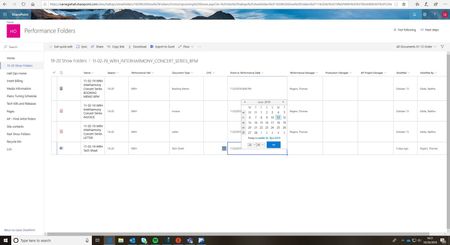
Hello -all, I wondering with someone faced that issue on SharePoint before? When I click on calendar to set a date on SharePoint, the language change by itself for a weird language as you can se...

DanZ24
Jul 01, 2020Tin Contributor
I think I may have corrected it. When you go into site settings/regional settings, I set the alternate calendar to Gregorian as well. Seems to be working now.
jkiblerfbibuildings
Jul 20, 2020Brass Contributor
Is this still working for you? Had a user report that the date column was in Czech again, both calendars settings are set to Gregorian.
- DanZ24Jul 20, 2020Tin Contributor
 d_acostaAug 06, 2020Copper Contributor
I am having this issue as well. Changed on its own. There are multiple lists on my subsite. The other lists does not have this problem. I have been working on a new PowerApps form for this list, not sure if this is the cause of the problem. Lists that do not have this problem use the default SharePoint form.