Forum Discussion

SharePoint Auditing

Hello Taen keren,
There is no "out of the box" permissions report with SharePoint Online but you can check individual user access by using the "Check Permissions" command (under "User and Permissions", choose "Site Permissions").
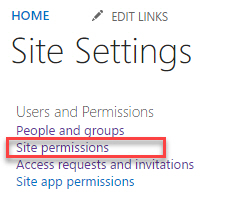
For a complete permissions report you will need a custom PowerShell script or a 3rd party app like Sharegate desktop.
I hope this helps.
Norm

Hi Norman Young
Must be possible without 3' party - I've looked for some powershell
- Norman YoungMar 28, 2019MVP
Glad to hear you found an existing script without having to write your own.
- Taen kerenMar 28, 2019Steel Contributor
also found this - currently running - looks good
https://gallery.technet.microsoft.com/Office-365-Reporting-Tool-7987b4c2
- StephenRiceApr 01, 2019
Microsoft
Hi Taen keren,
We are also going to releasing an official sharing report feature for OneDrive & SharePoint soon :) You can check out a demo of it during the External sharing in OneDrive & SharePoint talk from Ignite 2018. Thanks!
Stephen Rice
OneDrive Program Manager II
