Forum Discussion

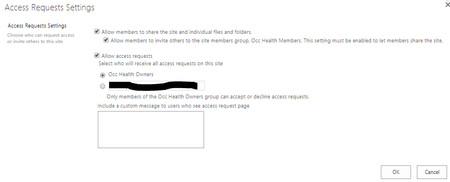
SharePoint Access Requests Settings

 Microsoft
Hi all,
I helped make this improvement happen so if you have any questions, hit me :) Message center post may have expired unfortunately but the documentation has been updated.
There were two pieces to the change:
1) Make it clear who is receiving access requests (especially since it used to default to "someone@example.com" which I'm pretty sure doesn't help ;). It's now clear if you're selecting the default (owners) or another e-mail address of your choice.
2) Show a custom message on the access request page.
Thanks!
Stephen Rice
OneDrive Program Manager II

hi Stephen
its a great feature but today I came upon a site I set up way back when. For this site the 'group' option greyed out and says 'no owner group defined'. The site definitely has an owner group. any ideas how I can fix this?
thanks
Ella
 vijay dirisalaJul 03, 2018Copper Contributor
Hi Ella,
You might have deleted the default site owners group from site.
Thank you,
Vijay
- FromelardJul 04, 2018Steel Contributor
If you want to reset that default groups configuration (subsite or rootsite) Owners, Members, Visitors (in case of deletion of site migration for example).
You can use that technical page (not available from the settings menu):
- http://Tenant.sharepoint.com/sites/yourSite/YourSubsite/_layouts/15/permsetup.aspx
That will offer you the choice from the existing groups list or create your own.
Fab
- Georgeina BakerFeb 06, 2019Iron ContributorThanks for the URL - saved me hunting high and low. :)
- StephenRiceJun 29, 2018
Hi Ella Visani,
What type of site are you on? Can you send me a screenshot of what you are seeing? Thanks!
Stephen Rice
OneDrive Program Manager II

