Forum Discussion

SharePoint Access Requests Settings


 Microsoft
Hi all,
I helped make this improvement happen so if you have any questions, hit me :) Message center post may have expired unfortunately but the documentation has been updated.
There were two pieces to the change:
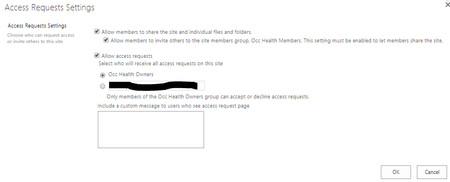
1) Make it clear who is receiving access requests (especially since it used to default to "someone@example.com" which I'm pretty sure doesn't help ;). It's now clear if you're selecting the default (owners) or another e-mail address of your choice.
2) Show a custom message on the access request page.
Thanks!
Stephen Rice
OneDrive Program Manager II
 gabeholcombMar 14, 2022Copper ContributorStephen,
I have an issue with the radio buttons being greyed out in access request settings on all subsites I'm an SCA so not sure why I wouldn't be able to save or make changes- Dorje-McKinnonMar 15, 2022Steel Contributor
Hi gabeholcomb
I assume you're talking about "access request settings" from the /_layouts/15/user.aspx page.
You mention sub sites are the issue, that would indicate that you're doing this using on premise SharePoint or in a Classic SharePoint site that has been migrated to SharePoint online.My posts all involved SharePoint Online sites. You may need to look for information that is specific to your version of SharePoint.
The other thing would be to check you are a Site Collection Admin (SCA) for each of the sub sites too.
Sorry I don't have more useful info.
Access Request Settings
- Dorje-McKinnonOct 16, 2018Steel Contributor
Hi StephenRice,
We are getting a mismatch between MS Teams SharePoint Members group and the MS Teams members group. This is because often staff have their first interaction with a Team via the Team's SharePoint site. If they don't have access they request access.
This sends an email to the MS Teams SharePoint Owners group (the default, and how our sites are setup), the owner then clicks the Accept link in the email.
Accept adds the person to the MS Teams SharePoint Members group BUT NOT the MS Teams Members group.
I understand that there are times when there is a need to give access to just the SharePoint content , and not the entire Teams experience.
I also understand that this issue is arising because this is a legacy feature.
What would be great is the following:
If the SharePoint site is related to a MS Team, then on the Permissions / Access request screen have a 2 radio buttons "Access request Accept action: Add requester to SharePoint members OR Add requester to Team members"
- The other way to do this would be in the Request access email that goes to Site owners. Change the wording to "Accept request: Add to SharePoint members OR Add to Team members"
Let me know what you think
- StephenRiceOct 17, 2018
Hi Dorje-McKinnon,
When the user is request access, there should be a set of radio buttons asking them if they want access to just the site (or file or folder) or if they want to request membership in the group. Are your users not seeing this? Thanks!
Stephen Rice
OneDrive Program Manager II
- Dorje-McKinnonOct 17, 2018Steel Contributor
Hi StephenRice,
Wow thanks for the quick response.
From the teams app, users can search for teams, but if they aren't a member of it already they get the "Hmm we can't find any matches" message.
If the staff member gets a link to the SharePoint part of a private team, they get the attached standard SharePoint "Access required : You need permission to access this site" message with a comment box and request access button.
My guess is that there is a setting that we haven't set in our tennant, which shows the radio buttons you mention. Just like Dean_Gross
[Shout out for Dean, thanks for all the great questions and answers you post]
Like
- Tina A GaravagliaJul 10, 2018Iron Contributor
Hi Stephen,
This change was a surprise for me in our tenant; however, I like the concept of now being able to assign the Owners group or an individual to these requests and also the ability to set a custom message. Nice touch.
The question / issue for me is why when we set an email address to receive the request, why do all owners still receive the access request email and not just the email address specified? Everything looks set correctly. Has anyone else noticed this?
Thanks!
- StephenRiceJul 11, 2018
Can you share how you have the access requests set up? You should have options for whether the mails go to the owners group or a specified e-mail address. If they're going to both, then that definitely doesn't sound right :) Thanks!
Stephen Rice
OneDrive Program Manager II
- Tina A GaravagliaJul 11, 2018Iron Contributor
Thanks for the quick reply. I am attaching a screen shot of how the Access Request setting is set up for the site (see below). When someone requested access the other day, my Team Lead also received a copy of the email--he is not the person specified below, but he is in the Owners group. I just cannot see what is wrong here.
 Ella VisaniJun 29, 2018Copper Contributor
hi Stephen
its a great feature but today I came upon a site I set up way back when. For this site the 'group' option greyed out and says 'no owner group defined'. The site definitely has an owner group. any ideas how I can fix this?
thanks
Ella
 vijay dirisalaJul 03, 2018Copper Contributor
Hi Ella,
You might have deleted the default site owners group from site.
Thank you,
Vijay
- FromelardJul 04, 2018Steel Contributor
If you want to reset that default groups configuration (subsite or rootsite) Owners, Members, Visitors (in case of deletion of site migration for example).
You can use that technical page (not available from the settings menu):
- http://Tenant.sharepoint.com/sites/yourSite/YourSubsite/_layouts/15/permsetup.aspx
That will offer you the choice from the existing groups list or create your own.
Fab
- StephenRiceJun 29, 2018
Hi Ella Visani,
What type of site are you on? Can you send me a screenshot of what you are seeing? Thanks!
Stephen Rice
OneDrive Program Manager II
 Andy5May 22, 2018Steel ContributorThis is a welcomed change, thanks Stephen.
I often have difficulties explaining the top two access request settings tick boxes.
Below is what I send to people, is it possible for the text to be change to explain things a bit better?
Please let me know if I have this wrong.
-------------
* Allow members to share the site and individual files and folders.
This tick box determines whether users (ignore the word members, it's misleading, this is for anyone with access to your site except owners) can share the site, files and folders with or without your permission first. If this is unticked, the access request person/group will receive an email asking them to approve every time someone on your site tries to share something.
* Allow members to invite others to the site members group, *your site here* Members. This setting must be enabled to let members share the site.
This tick box determines whether users (people actually in the member's group this time or with similar permissions, but not people in the visitor's group or with similar permissions) can share the site (not files or folders) with or without your permission first. If this is unticked, the access request person/group will receive an email asking them to approve every time people in the member's group try to share the site.
--------------------
Would it be possible to alter the text displayed to make things clearer?- Dean_GrossMay 11, 2018Silver Contributor
What I really would like to see it that these requests result in the requestors account being added to the Office Group instead of the SharePoint Group. Is this on your roadmap?
- StephenRiceMay 18, 2018
Hi Dean_Gross,
If the user is requesting access to a site, I believe that option does exist. We don't offer it for document access requests as the end result is the user getting access to additional content (which may not be intended). If this is something you'd like to see, feel free to suggest it on User Voice though! Thanks,
Stephen Rice
OneDrive Program Manager II
- Andy5May 22, 2018Steel ContributorHi Stephen,
It would be great to see access requests in the modern site permissions sidebar, rather than having to go into site settings.
- May 07, 2018
Some anomalies:
In a Community Site (/sites/...) it references the Owners Group.
In a Office 365 Groups connected Site (/sites/...) (group started in Yammer) it references the "Admins" group
In a Classic Team Site site (/teams/...) in some of them I see Members and some I see Owners.
- StephenRiceMay 08, 2018
Hi KevinCrossman,
Thanks for flagging this! Group connected sites should be sending the access requests to the O365 Group Admins so this is expected. The other two are anomalies so we'll track down what's happening here. Thanks!
Stephen Rice
OneDrive Program Manager II
- Gitte BergmanJan 08, 2019Tin Contributor
Hello StephenRice
I have a situation where a Group connected site is the parent of a number of subsites. The subsites are in themselves not group connected. They will be used by people grouped into MS SharePoint teams: subsite Owners and subsite Members.
Access request settings in the parent is as expected, the Parent Admins-group (i.e. O365 Team Owners). When I go to Access request settings for each of the subsites however, the name of the suggested group is Subsite Admins which does not exist, and neither does a corresponding O365 Team. How can I make access requests made for a subsites go to the subsite's Owners group? Below image shows the Access Request Settings page. Behind it you see the groups available. In our organisation, the name of any O365 Teams group starts with a hash (#) so it is easy to identify what is a O365 Teams group and what is a MS SharePoint Team group.
Much grateful for any assistance here.


