Forum Discussion

temhkam
Feb 06, 2023Copper Contributor
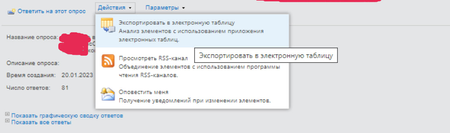
SharePoint 2013 "Export Spreadsheet" outputs in Excel only 30 rows
Hi, all! SharePoint 2013, when I click on the "Export Spreadsheet" button from the survey, the file "owssvr.iqy" is downloaded. Opening it, it opens in Excel and there are only 30 rows in the tabl...

Adnan_Amin
Feb 06, 2023MVP
Hi temhkam,
In SharePoint 2013, when you export a survey to a spreadsheet, the maximum number of rows that can be exported is limited to 30. To export all the answers, you need to modify the query used by the "owssvr.iqy" file. Here's how:
- Open the "owssvr.iqy" file in a text editor like Notepad.
- Look for the line that begins with "URL;".
- Add the following query string parameter to the end of the URL: &RowLimit=0.
- Save the file and close the text editor.
- Double-click the "owssvr.iqy" file to open it in Excel.
This should now export all the answers in the survey, not just the first 30. If you still have issues, try increasing the row limit by adding a larger number in place of "0", for example &RowLimit=1000.