Forum Discussion

ca_rem
Jun 28, 2019Brass Contributor
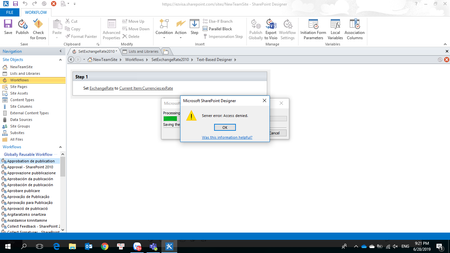
Sharepoint 2010 Workflow error: Access Denied
When I Publish or Save a new Sharepoint 2010 Workflow. It warning me "Server Error: Access Denied". The Sharepoint 2013 Workflow work fine. I'm an administrator account of my tenant and I have full ...
 Oct 31, 2019
And if this is the first time you've tried a 2010 workflow for a site collection in SPO, you have to make sure the DenyAddAndCustomizePages is turned off. You can tell if you look at your security on the site through the advanced settings, you'll see a 'Deny' section.
Powershell to do that:
# set security so can use 2010 workflows
# have to do this to every site we want to use 2010 workflows o, including all class istes
# also, this is what gives us the content editor web part. We don't have to turn on publishing.
$cred = Get-Credential
Connect-SPOService -Url https://NAMEOFTENANT-admin.sharepoint.com -credential $cred
Set-SPOSite -Identity https://NAMEOFTENANT.sharepoint.com/sites/NAMEOFSITE -DenyAddAndCustomizePages $false

# double check the settings is correct
$site = Get-SPOSite -Identity https://NAMEOFTENANT.sharepoint.com/sites/NAMEOFSITE
$site.DenyAddAndCustomizePages
Disconnect-SPOService
Robin Nilsson
Oct 31, 2019Bronze Contributor
And if this is the first time you've tried a 2010 workflow for a site collection in SPO, you have to make sure the DenyAddAndCustomizePages is turned off. You can tell if you look at your security on the site through the advanced settings, you'll see a 'Deny' section.
Powershell to do that:
# set security so can use 2010 workflows
# have to do this to every site we want to use 2010 workflows o, including all class istes
# also, this is what gives us the content editor web part. We don't have to turn on publishing.
$cred = Get-Credential
Connect-SPOService -Url https://NAMEOFTENANT-admin.sharepoint.com -credential $cred
Set-SPOSite -Identity https://NAMEOFTENANT.sharepoint.com/sites/NAMEOFSITE -DenyAddAndCustomizePages $false

# double check the settings is correct
$site = Get-SPOSite -Identity https://NAMEOFTENANT.sharepoint.com/sites/NAMEOFSITE
$site.DenyAddAndCustomizePages
Disconnect-SPOService