Forum Discussion

Set Default Sharing to "People with Existing Access"
- Jan 09, 2019
Hi Gilbert Okello,
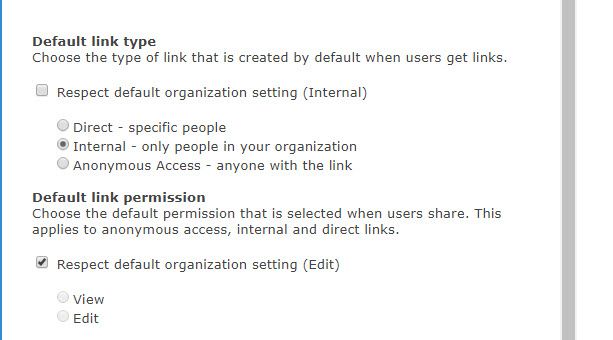
We do not support setting the default to people with existing access. When the default link is not available, we set the default to the next supported default link (which in the case above, is specific people). If this is a capability you're interested, I'd suggest submitting this to onedrive.uservoice.com to help us prioritize the work. Thanks!
Stephen Rice
OneDrive Program Manager II

I'd just like to provide some context where this functionality would have helped us and our users avoid risk during an intranet migration.
As an intranet admin, we periodically move intranet URL e.g. to start using Modern site features.
To stop users getting to the old intranet, we remove them from the "old intranet visitors" group.
BUT
because we could not set the default sharing option in the old intranet to "people with existing access", after we move to the new intranet URL links created using the Share button for "specific users" OR "people in CompanyX with the link" still allow users access to the OLD content.
Please provide the facility to set the default share/copy link option to "people with existing access" , so that admins don't have to ShareGate or PowerShell, removing unique permissions on 10000s of files in the old intranet.
For collaboration spaces your reasoning behind the way share/copy link options work is perfect. But for authoritative files it introduces risk.
Thanks

 Microsoft
Hi Dorje-McKinnon,
Thanks for the feedback and context! As I've mentioned above, there's nothing specific I can say here just yet but we're certainly looking at this area and seeing how we can improve. Thanks!
Stephen Rice
OneDrive Program Manager II
- Dorje-McKinnonJun 14, 2019Iron Contributor
StephenRice Many thanks for getting back to us so quickly.
For those reading we solved this problem using ShareGate
To do this in bulk, you can use ShareGate’s explorer function for a library, select all the items in the library, then click the “Restore inheritance”. This removes the links created by users clicking the Get Link or Share buttons. In our situation this meant the old intranet files still existed BUT were finally no longer accessible to users, thus avoiding an out of date policy or procedure being used.