Forum Discussion

Set Default Sharing to "People with Existing Access"
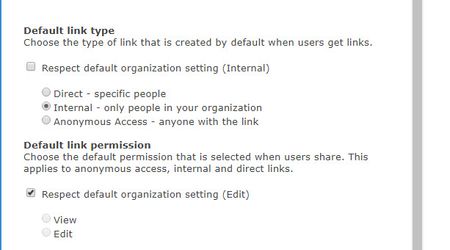
- Jan 09, 2019
Hi Gilbert Okello,
We do not support setting the default to people with existing access. When the default link is not available, we set the default to the next supported default link (which in the case above, is specific people). If this is a capability you're interested, I'd suggest submitting this to onedrive.uservoice.com to help us prioritize the work. Thanks!
Stephen Rice
OneDrive Program Manager II


Hi LisaJo48 ,
My previous comment was pointing you to creating your own code that did 2 things:
- get a list of all the sites in your tenant
- then for each one of those set the following
Something like the following| NOTE check this with ONE or two sites first, before doing it across all 800 of your sites.
 Import-Module Microsoft.Online.Sharepoint.PowerShell -DisableNameChecking

#change XXXX for your tenant name
 $AdminSiteURL="https://xxxx-admin.sharepoint.com"

 $Credential = Get-credential
Connect-PnPOnline -Url $AdminSiteURL -Interactive

 #sharepoint online list all site collections powershell
#Get All Group Sites
 $SitesInTenant = Get-PnPTenantSite -Template GROUP#0

#for each site then set the property you want
 ForEach($Site in $SitesInTenant)
 {

#reference https://pnp.github.io/powershell/cmdlets/Set-PnPSite.html#-defaultlinktoexistingaccess

Set-PNPsite -identity $site.url -DefaultLinkToExistingAccess $true

}
NOTE - set-pnpsite code updated 24 Nov to be $site.url
Reference for this is here
https://pnp.github.io/powershell/cmdlets/Set-PnPSite.html#-defaultlinktoexistingaccess

Hi Dorje
Thank you very much for script. However I tried your script and I get this error message for each instance:
Set-PNPsite : Invalid URI: The format of the URI could not be determined.
At line:19 char:1
+ Set-PNPsite -identity $site -DefaultLinkToExistingAccess $true
+ ~~~~~~~~~~~~~~~~~~~~~~~~~~~~~~~~~~~~~~~~~~~~~~~~~~~~~~~~~~~~~~
+ CategoryInfo : InvalidOperation: (:) [Set-PnPSite], PSInvalidOperationException
+ FullyQualifiedErrorId : InvalidOperation,PnP.PowerShell.Commands.Site.SetSite
When I enter the URL of the Site directly instead of the $Site variable it works fine. Also I checked the contend of the $Site variable and it inherits the right URL. Therefore I am very confused of this error message as the URL should be correct.
Thank you for your help!
Best
Stephan