Forum Discussion

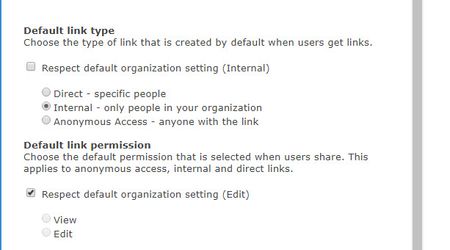
Set Default Sharing to "People with Existing Access"
- Jan 09, 2019
Hi Gilbert Okello,
We do not support setting the default to people with existing access. When the default link is not available, we set the default to the next supported default link (which in the case above, is specific people). If this is a capability you're interested, I'd suggest submitting this to onedrive.uservoice.com to help us prioritize the work. Thanks!
Stephen Rice
OneDrive Program Manager II

 Microsoft
Hi Frank McDermott,
You can now set People with Existing Access as the default link type for any site collection via PowerShell and this should be available in the modern SharePoint Admin Center soon! We'll continue to listen to feedback here around how we can make further improvements though! Thanks!
Stephen Rice
Senior Program Manager, OneDrive

It completed with out any errors however the share sheet default option is still the same “people in my org with link”
How long does the change take to apply?
Is that the right command? Note: I used my tenant when I ran it.
- StephenRiceApr 10, 2020
Arne Vandeleene, thanks for the feedback! Our aim has been to build a lot of great controls here so that admins can tune the experience to fit their specific needs as needed. And we're always looking to improve in this space!
Michael Rennie, the command only works on a per-site basis so if you ran it for mytenant.sharepoint.com, it will only apply on that site collection. You will need to run it for each site collection where you want this default to apply (e.g. tenant.sharepoint.com/teams/team1, tenant.sharepoint.com/sites/projectalpha, etc).
Hope that helps!
Stephen Rice
Senior Program Manager, OneDrive
- LisaJo48Sep 20, 2022Iron Contributor
Any update to this per-site setting of the default sharing link to People with existing access? We would like this to be our tenant default and not have to type in every link to 800 site collections.


 🤞🙏
🤞🙏- Dorje-McKinnonSep 20, 2022Iron Contributor
Hi LisaJo48 ,
You can do this using PowerShell in a couple of different ways.
If you use Sensitivity labels you can use those to define the type of sharing for each site. More info here https://office365itpros.com/2021/06/08/default-sharing-link-settings/
If you want to set every site to a specific type of sharing you can do that using the following powershell
Set-SPOSite -identity https://YourTenant.sharepoint.com/sites/YourSite -DefaultLinkToExistingAccess 1
Reference https://lightningtools.com/blog/sharepoint-default-sharing-link-people-with-existing-access
You or your IT team should be able to adapt the following, to run the above script for everyone of your sites if that is what you want to do.
I hope this helps.
 Robin NilssonApr 13, 2020Bronze Contributor
StephenRice I was trying to set this today on a couple of sites since my security officer is reviewing our settings, and my PowerShell is giving me an error that the site is a group site and -DefaultSharingToExistingAccess isn't legit for a group site. Am I just behind on my PowerShell module? 16.0.19927.12000 is what I have installed. Or oes this mean not available yet?
16.0.19927.12000
Set-SPOSite :
https://XXXX.sharepoint.com/sites/SSSS is a
Groups site collection. The valid parameters for this type of
site collection are '-Identity', '-AllowSelfServiceUpgrade',
'-DefaultLinkPermission', '-DefaultSharingLinkType',
'-DenyAddAndCustomizePages', '-DisableCompanyWideSharingLinks',
'-DisableSharingForNonOwners', '-LockState', '-Owner',
'-ResourceQuota', '-ResourceQuotaWarningLevel',
'-SandboxedCodeActivationCapability', '-SharingCapability',
'-ShowPeoplePickerSuggestionsForGuestUsers',
'-SocialBarOnSitePagesDisabled', '-StorageQuota',
'-StorageQuotaReset', and '-StorageQuotaWarningLevel'.
At line:1 char:1
+ Set-SPOSite -identity
https://XXXX.sharepoint.com/sites/SSSS...
+ ~~~~~~~~~~~~~~~~~~~~~~~~~~~~~~~~~~~~~~~~~~~~~~~~~~~~~~~~~~~~~~~
~~~~~
+ CategoryInfo : NotSpecified: (:) [Set-SPOSite], Se
rverException
+ FullyQualifiedErrorId : Microsoft.SharePoint.Client.ServerE
xception,Microsoft.Online.SharePoint.PowerShell.SetSite- StephenRiceApr 13, 2020
Hi Robin Nilsson,
It's definitely worth double checking to make sure you have the latest version of PowerShell but I'll double check this on our side. Thanks!
Stephen Rice
Senior Program Manager, OneDrive

