Forum Discussion

Set Default Sharing to "People with Existing Access"
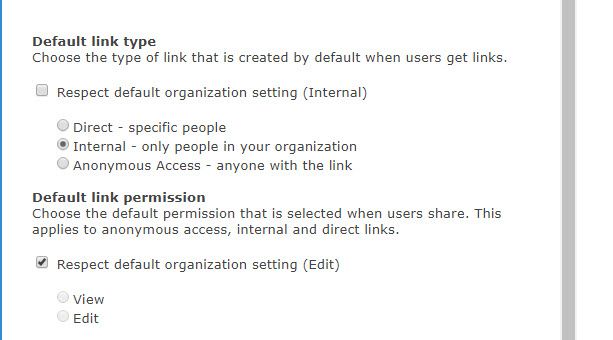
- Jan 09, 2019
Hi Gilbert Okello,
We do not support setting the default to people with existing access. When the default link is not available, we set the default to the next supported default link (which in the case above, is specific people). If this is a capability you're interested, I'd suggest submitting this to onedrive.uservoice.com to help us prioritize the work. Thanks!
Stephen Rice
OneDrive Program Manager II

 Microsoft
Hi Frank McDermott,
You can now set People with Existing Access as the default link type for any site collection via PowerShell and this should be available in the modern SharePoint Admin Center soon! We'll continue to listen to feedback here around how we can make further improvements though! Thanks!
Stephen Rice
Senior Program Manager, OneDrive

Hi StephenRice
Thanks so much for getting back to this thread.
I used it only yesterday - awesome.
Please thank your entire team for all the work I know they're doing in very trying work and personal situations. It makes our lives out here on the front lines easier every day.
thanks from the South Pacific
Dorje
- StephenRiceApr 02, 2020
My pleasure! I'll be sure to pass this along to the rest of the team!
Stephen Rice
Senior Program Manager, OneDrive
 Arne VandeleeneApr 08, 2020Copper Contributor
What I don't get, working with MS Teams, every owner of a Team has full access, so if we, as admins set security, they can just override it and do whatever they want, share it with whoever they want within the company (at least we can restrict sharing with external on a tenant level) How can this be solved? Since when does Microsoft think it's ok to let non IT people set security on files and folders? Default usage should be "people with existing access", that's the way it's configured by IT and users can't just go around changing security. With GDPR and ISO certifications in mind, you just can't explain this. This should be the number 1 priority for Teams/Sharepoint, get the security up to business standards.