Forum Discussion

Mark-Kashman
Aug 31, 2016Former Employee
ROLLING OUT: SharePoint Online team sites + Office 365 Groups & Pages
Today marks the beginning of bringing the full power of SharePoint to Office 365 Groups, with additional benefits to SharePoint Online all up! New and existing groups will get modern team sites, whic...

Ivan54
Oct 17, 2016Bronze Contributor
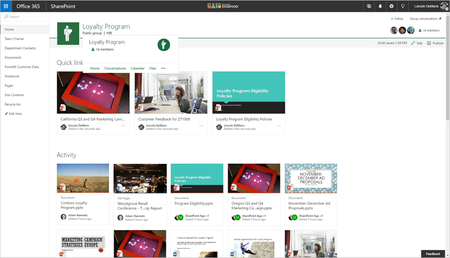
Just got the modern pages as well. Groups Homepage automatically gets Quick Links and Activity Webparts.
For existing SharePoint Teams Sties you'd have to create a new page add those 2 webparts manually.
For existing SharePoint Teams Sties you'd have to create a new page add those 2 webparts manually.

Ruben Kertesz
Oct 18, 2016Iron Contributor
I also see the sites link from within the groups page but it kicks me back to the documents page and there is no link to any other page. If I delete everything after the site path, it still sends me back to the documents page anyways. Is this normal for others as well?
Also, does anybody know if this will also include auto creation of a group when a new team site is created?
Also, does anybody know if this will also include auto creation of a group when a new team site is created?
- Ivan54Oct 18, 2016Bronze ContributorI'm also sent to the documents page when I first clicked Site. But I have a "Home" link in the left quick navigation. After clicking this Home once, the "Site" link changes from documents to the home.aspx for me and my groups.
 LincolnDeMarisOct 18, 2016
Microsoft
Yes - this is the intended behavior.
- Ivan54Oct 18, 2016Bronze Contributor
is this target variable saved group wide or locally on each client?