Forum Discussion

Remove items in New button
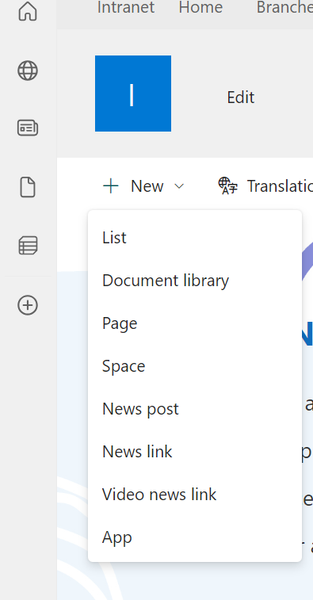

Hi ptrckldc
Yes, it is possible to hide or remove items from the "New" button menu in your hub site's home page. To achieve this, you can use SharePoint's customization options and permissions settings. Here's a step-by-step guide:
Step 1: Access Site Settings
- Go to the hub site's home page and click on the gear icon (⚙️) in the upper-right corner.
- From the dropdown menu, select "Site Settings."
Step 2: Manage Site Features
- Under the "Site Actions" section, click on "Manage site features."
- Locate and deactivate the feature called "Team Collaboration Lists." This feature enables the creation of lists, libraries, and other collaborative items.
Step 3: Adjust Library/List Permissions
- If you want to prevent users, including owners, from creating a new document library or list, you need to adjust the permissions for the site.
- Click on "Site permissions" under the "Users and Permissions" section.
- Choose "Advanced permissions settings."
- For the "Owners" group or any other groups with permissions to create libraries/lists, click on "Edit User Permissions."
- Remove the "Add Items" or "Add and Customize Pages" permissions, which will prevent them from creating new libraries or lists.
After following these steps, the "New" button menu should no longer display the options to create a new document library or list. Please note that these changes will affect all users with the same permissions. If you want to customize the menu differently for different user groups, you may need to consider using custom scripting or solutions.
Remember that modifying permissions should be done with caution, especially if you are dealing with a hub site that has connected sites and a complex permission structure. Always test these changes in a development or staging environment before applying them to the production site.
- SvenSieverdingJul 29, 2023Bronze Contributor
Hi Lalit Mohan,
Option 2) is not really the case.
The "Team collaboration lists" feature once brought you the templates for special lists like the classic calendar and tasks. Per default this is deactivated on communication sites, but activated on team sites. However, deactivating that feature on a team site will not remove the "New->List" or "New->Document" Link on the homepage. (You cannot even use the templates from that feature anymore, except you manually open the URL "<Site collection>/_layouts/15/create.aspx" and create a classic list from there)
However there is a "Spaces" site feature. If you disable that, then the "New"->"Spaces" Link disappers.
If you also disable the "Site Pages" feature, then you get rid of the "New"->"News link", but the "New"->"Page" and "New"->"News Post" links stay.
Modern pages seem to still be working even without these features.
Option 3) is also not really true."Add and Customize Pages" is not a default permission level you can use. (But you could create that one.)
"DenyAddAndCustomizePages" is a site property that an SharePoint administrator can change using powershell to enable custom scripting on a given SharePoint site
But you can use permissions to remove some of the links from the "New" Menu,
You can remove the "New"->"List", "New"->"Document library" and "New->App"links for a user by modifiying the permissions.
If you want to diable these links for your members then you need to go to "Gear"->"Site Information"->"View all site settings"->"Site Permissions". Then mark the "Members group" and select "Edit User Permissions". Now switch the permission level from "Edit" to "Contribute".
If you want to diable these links for the owners, then it is more difficult. In that case you would need to set up a custom permission level that excludes some permissions like "Manage Lists" and some others.But I think in ptrckldc 's case it would be easier to also set the permissions for the "Owners" group to the default permission level "Contribute" or simply to move all owners into the "Members" Group and change the permission level to "Contribute" as explained above. ( ptrckldc I think you want to give the owners less control about the site in general)
However, this only works on a communication site. On a team site the default SharePoint groups and permission levels are not editable and you would have to change into a quite complicated custom permission setup.
Also you cannot remove permissons from someone who is a site collection admin. (That role overrides all other permission settings)
So you can get down to this on a communication site playing arround with permissions and featuresIf you want to get rid of the "Page" and "News post" links then you would need to change the permissions on the "Site Pages" Library to "Read". But in that case your users would no longer be able to edit and create new pages at all.
ptrckldc What exactly are you trying to achieve?
I think that i understand that you want to create a site that has a predefined structure and that you don't want even owners of that site to change that structure.
In that case I would simply add all users into the "Visitors" group (so no user can change anything) on site level. None of these users will have the "New" button at all.
Then I would go into the libraries and lists where these users should be able to edit elements, break the permission inheritance and give the "Visitors" group "Edit" permissons there.
Best Regards,
Sven
