Forum Discussion

Read-Only permission is able to create new list item using the list forms shared with them

Greetings John, as far I understand your query :
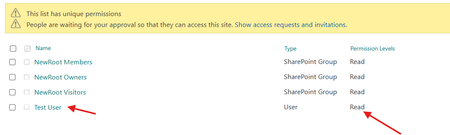
You gave a user (Test User) Read-Only access to a SharePoint list. As expected, when they open the list directly, they cannot add, edit, or delete items.
However, after you (Admin) created a custom list form and shared the form link with the Test User, they were able to submit a new list item—even though they only have read permission. This behavior can affect your business rules and security expectations.
Why is This Happening?
This issue occurs because of how SharePoint and Power Apps handle permissions on shared forms.
If you share a custom form (like one built in Power Apps or customized via SharePoint), it can sometimes run with elevated permissions—specifically, the permissions of the person who created or shared the form. This means:
Even if the user only has Read access to the list,
The form might still allow them to add new items,
Because it is running under the permissions of the Admin or whoever created the form.
Possible Fix that could help:
Here are several ways to lock down the list and prevent Read-Only users from submitting data through shared forms.
1. Restrict Access to the Form
If your form was built using Power Apps:
Go to Power Apps
Open the app or form you shared
Click on "Share"
Make sure only users who should be able to submit items are granted access
Remove any users (like Test User) who should not have editing rights
In the app settings, check whether the app is set to run as the "Creator" or as the "User"
Set it to run as the User so that their actual permissions apply
2. Adjust Item-Level Permissions in the SharePoint List
To prevent anyone from adding items unless explicitly allowed:
Open your list
Go to Settings > List Settings > Advanced Settings
Under Item-level Permissions, configure:
Read access: "Read items that were created by the user"
Create access: "None"
This setting enforces stricter control and ensures that users cannot add new items through any form or method unless they have specific permissions.
3. Break Permissions on the Form Page
If the form is shared on a SharePoint page or embedded in a modern list form:
Go to the page where the form is hosted
Click Settings > Site Contents, find the page or form
Select Manage Permissions
Break inheritance
Remove users like Test User or ensure they only have view-only access to the form page
This ensures that they cannot use the form unless they have proper list permissions as well.
Kindly check and let us know if this could fix your issue.
Kind Regards,
Manik :)
 johnjohn-PeterApr 11, 2025Steel Contributor
first this issue will not happen with power app, as power apps interact with the SharePoint using the login users credential, so if the user does not have access to the list or has read-only to the list, then the user will never be able to add a new item through power apps, even if the app is shared with the user.. the issue is happening specifically to list forms.. Also not sure what the list settings such as "Item-level Permissions" has to do with this, as it target different scenario , where it allow users to only view items created by them, or only edit items created by them.. it does not have to do with the issue i am referring to..