Forum Discussion

 Microsoft
UPDATE: Support for Structured/Managed Navigation enabled on Modern Pages in Classic Team Sites
 Microsoft
Thanks for the additional detail RichardSharp11 (and sorry if I missed these previously). Yes, as we're effectively supporting the classic provider our goal is to have parity of behavior (which, incidentally, for structured is two-levels in global and current, but for managed, three-levels in global and two-levels for current) - so there appears to be a bug here (which others have since reported). We are investigating this now.
I've also noted the issue of your alternate CSS not being honored. We'll investigate this and get back to you via this thread.
Thanks for reporting - I want to fulfill your goal and get you on the modern views!

Hi ssquires,
Thanks for your response and continued efforts to resolve these issues!
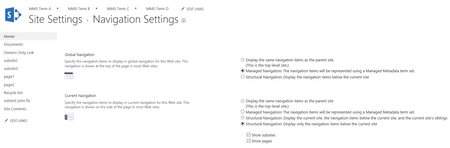
One note: We also have Publishing sites using Structured navigation in global, with the same concept we use in our sites with Managed navigation. In looking at those sites, we see that Structured navigation also supports three levels, just the same as Managed Navigation. All that's required is that you check the box to Show Subsites in the navigation in the Level 2 site. Then you see the flyouts just the same as you have in Managed navigation. The picture below is such a site (Classic, Publishing, Structured Global). It seems to be just the Publishing feature itself that enables the third level, which is what makes the feature so valuable! Thanks,
Richard

 Thaddeus FerberMay 23, 2017Brass Contributor
Hi Sean,
Good request for clarification. Our (small) organization has all our files saved in a single document library. The primary way our staff navigates the document library is through tree-view control to filter the document library by nested metadata tags. (For us, this was the key to user adoption, allowing staff to use a UI that is similar to the one they were used to in their old file share with nested folders. Only instead with our SharePoint configuation they would be now using tags instead of folders.)
In re-reading this thread, our use case is indeed different from the primary one that this thread focuses on: we are not looking to have the top nav bar being used to navigate multiple sites (since we don't have multiple sites).
But it is still, I think, relevent to the topic of managed metadata navigation.
What we are looking for is a way to create dynamic metadata navigation, using the benefits of both Managed Metadata and Search. The result we want is a dynamic navigation that is built in through a taxonomy that shows the current search results filtered by the current node (with or without children, depending on the current configuration).
This can be done through using Content Search Web Part as described here: https://www.itunity.com/article/configure-managed-navigation-sharepoint-2013-step-step-94 (that link also captures perfectly the navigation behavor we are looking for).
However, we are an E1 subscriber which only gives us access to SharePoint Online 1 functionality, which does not include Content Search Web Part. There does not appear to be a way to do it through Content Query Web Part.
So we need to instead use this "A No-Code Way to Hack SharePoint's URLs to Filter by Managed Metadata and Show Child Terms" https://www.rightpoint.com/404?item=%2fblogs%2fviewpoint%2farchive%2f2015%2f01%2f08%2fa-no-code-way-to-hack-sharepoint-39-s-urls-to-show-child-managed-metadata-terms&user=extranet%5cAnonymous&site=website which is 1) clumbsy, and 2) need to be done by hand every time there is a new term we want to give users a link to.
Any ideas of how we might be able to achieve the desired navigation UI?
- ssquiresMay 22, 2017
Thaddeus Ferber - we are working on providing a modern metadata navigation experience for lists/libraries, as Miceile Barrett noted. Are you asking for the tree-view control for site nav? We aren't planning to bring that experience forward at this time, but I'd like to make sure I understand the ask and scenario; can you confirm/elaborate? Thanks.
- ssquiresMay 22, 2017Thanks Richard - yes, Scott and Adrienne reported same - we should be honoring three levels in horizontal managed nav. We are actively investigating a fix and should have something out soon.
- Thaddeus FerberMay 13, 2017Brass Contributor
This is a great start, thanks!
Could you next also please bring back the tree interface for managed metadata navigation and filtering as described here:
https://sharepoint.uservoice.com/forums/329214-sites-and-collaboration/suggestions/19270162-bring-back-tree-interface-for-managed-metadata-nav