Forum Discussion

Sharepoint migration tool download error
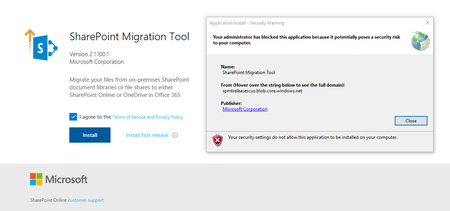


I tried Internet Explorer and in private mode of IE too- but could not download the file.
So I tried Google Chrome and I could not install Google Chrome either - same type of error message.
Thereafter I tried Firefox and was able to download the Build 18KB Application Manif file from the SharePoint Migration tool site; which after clicking on the downloaded file did not open Migration tool and gave the same original error.
Thus, it is not the browser but something on the local device which is restricting the installation of this file.
I suspect its windows rights management issue but don't know where to look for it?
 Benoit_PILASTREJan 03, 2019Copper Contributor
Hi, have you resolve this issue ? thank you.
- look-outJan 05, 2019Copper Contributor
Sorry for my delayed response. This was in August but I suspect I was able to resolve it.
I am happy you got another constructive response from the community and it worked.
Cheers!
 jorikpolhuisJan 03, 2019Copper Contributor
I found the solution at another site:
This is caused by the "ClickOnce Trust Prompt Behavior": https://msdn.microsoft.com/en-us/library/ee308453.aspx
To adjust this, simply change the values in the Registry and you should be able to install the application.
To enable the ClickOnce trust prompt by using the registry editor Open the registry editor:
Click Start, and then click Run.
In the Open box, type regedit32, and then click OK.
Find the following registry key:
\HKEY_LOCAL_MACHINE\SOFTWARE\MICROSOFT\.NETFramework\Security\TrustManager\PromptingLevel
If the key does not exist, create it.
Add the following subkeys as String Value, if they do not already exist, with the associated values shown in the following table.
https://i.stack.imgur.com/3Ri8v.png
On my computer, the values were set to "Disabled" and I have no clue which application did that. I changed the values to default and now everything works again like it should.
Or you can just delete the key "TrustManager" itself and everything is working as well.
source: https://superuser.com/questions/1252575/unable-to-install-clickonce-application-due-to-security-settings-windows-10
- Benoit_PILASTREJan 04, 2019Copper Contributor
Thank youuuuuuuuuuuuuu !! It works !!! :D
