Forum Discussion

pillbox
Mar 02, 2023Copper Contributor
SharePoint List Date Format Not Matching Site Locale Setting
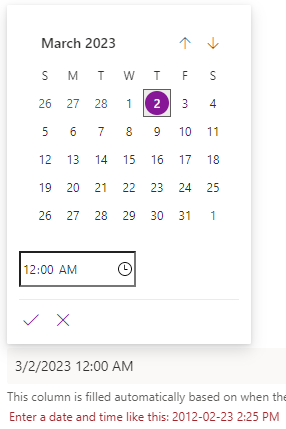
Hi everyone, I have just started experiencing an issue with a SharePoint List, where the date and time format doesn't match the column requirements. While our users can type out the date and time...

Jesse_Dan
Mar 03, 2023Copper Contributor
pillbox here you go. Also - when I changed my settings back to below for my user the issue did not resolve that day, it wasn't until a couple days later ... who knows if that had any bearing at all.
Here are the settings for my user in my MS account:
Delve settings, note I have changed the Region Settings to tbe 'Always use my personal settings'
Settings for the admin user that does not work:

pillbox
Mar 03, 2023Copper Contributor
Thanks Jesse_Dan,
I've updated my settings to yours exactly (other than timezone) and will monitor. It is interesting to me that your Delve region setting is set to United States as their date format is MM-DD-YYYY.
If I don't see any changes by end of Monday I will try Canada and continue to monitor.
- Jesse_DanMar 03, 2023Copper ContributorI am reasonably certain it did NOT used to be like that ... we changed so many things so many different times, I likely neglected to change it back to whatever it used to be (happy coincidence?).
Looking at those screenshots, I see that at one point I updated my MS Account profile to be United States, but changed the format to be yyyy-mm-dd instead of the detault US MM-DD-YYYY.
IDK - good luck though!- pillboxMar 06, 2023Copper ContributorQuick update; no combination of region settings has had any effect in solving this issue. Selecting time and date in a list column still defaults to USA date format regardless of region settings.
- Jesse_DanMar 07, 2023Copper ContributorSorry it didn't work for you. We have confirmed these settings work in our environment for more users than just me :). Our IT lead on the case had one and only one difference from my user and that was the date format in the MS account's regional settings. They had already switched it to English (United States), but their format was still mm/dd/yyyy. They updated the format to be yyyy-mm-dd, waited for an hour, and then they were able to enter dates in the lists without issue - bizarre.