Forum Discussion

Set Default Sharing to "People with Existing Access"
- Jan 09, 2019
Hi Gilbert Okello,
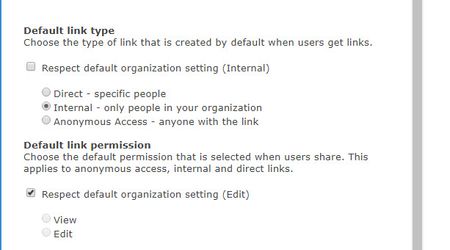
We do not support setting the default to people with existing access. When the default link is not available, we set the default to the next supported default link (which in the case above, is specific people). If this is a capability you're interested, I'd suggest submitting this to onedrive.uservoice.com to help us prioritize the work. Thanks!
Stephen Rice
OneDrive Program Manager II


Dorje-McKinnon
Sorry for bumping this old thread. Thanks again for providing this script, this was helpful in changing all 400 of our sites default to "Existing Access" as promised. I now would like to know if Microsoft will provide a way to have this be the default when a new Team is created, automatically (without having to manually change it in the admin portal). Is this something that is already possible and I"m missing it, or is Microsoft still working on that functionality?

Hi TedLarsen
Great question - can you set a default sharing setting for every new team you create?
For files you can use the SharePoint admin > Policies > Sharing > File and folder links menu item that is available here
https://<yourTenantName>-admin.sharepoint.com/_layouts/15/online/AdminHome.aspx#/sharing
Here you can set the tenant and onedrive default External sharing (we use "new and existing guests") AND the "File and folder links" options. You can choose between "Only people in your organisation" (we use this setting) or "Specific people (only the people the user specifies)" (we manually set this for some teams).
If you need to alter external guest access to the team e.g. email address removed for privacy reasons you need to do that via the TEAMS admin center policies.
I hope this helps.