Forum Discussion

Problem with Choice Column Radio Buttons Display Choice
 Jun 25, 2018
Our SharePoint Admin had to submit a ticket and both problems seem to be resolved.

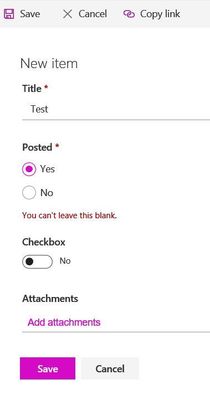
We are experiencing the same problem (see screenshot), and have had to lock the library into the 'classic' interface to overcome it. I would also like to know if there is an easy solution or if it is just a bug. The radio buttons work OK, but the free form text does not.
Dodgy choice field
Onno van Ewyk - Classic worked until we tried to add attachments in both new and classic.
Our admin reported the problem and the attachment problem seems to have been fixed for the radio buttons as long as we use classic.
BUT...I discovered the same attachment problem with Yes/No in New and Classic. And, with a Yes/No there is no mandatory to remove. Same behavior in that one hits Save which greys out and then nothing happens (see first post screenshot).
- CatherineBJun 18, 2018Iron Contributor
Update on the Yes/No column. Attachments work in New, but not in classic.